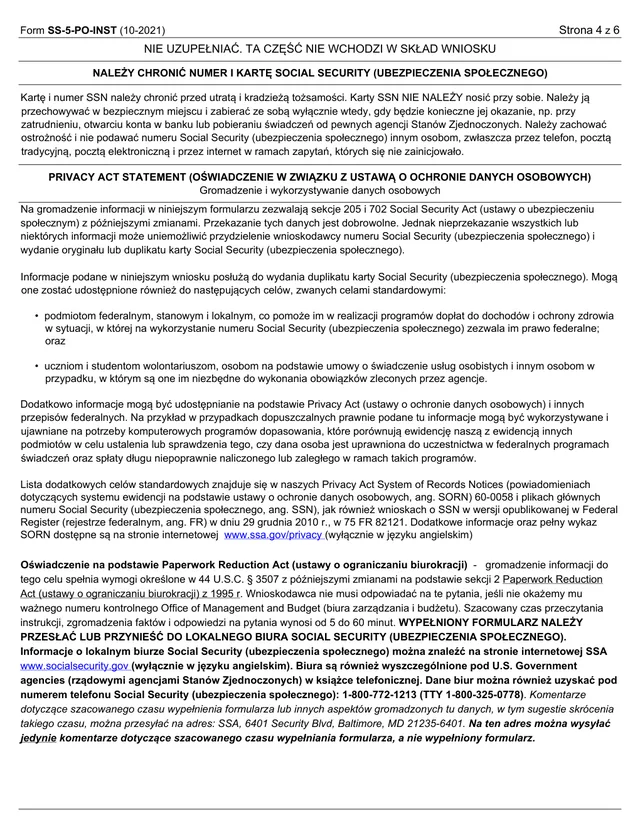
First page of Social Security Card Application - Free Process for Original, Duplicate Cards & Record Changes Page 4 preview

Other · United States / General

Social Security Card Application - Free Process for Original, Duplicate Cards & Record Changes

Wniosek o kartę Social Security (ubezpieczenia społecznego)

0Views
0Downloads
6Pages
1Fields
Fill form

Form details

Category
Other
Country
United States / General
Pages
6
Fields
1
Type
Fillable PDF
Added
25 Nov 2026

What's inside

Form content

Wniosek o kartę Social Security (ubezpieczenia społecznego)
Złożenie wniosku o kartę Social Security (ubezpieczenia społecznego) jest bezpłatne!
WNIOSEK MOŻNA ZŁOŻYĆ, ABY:
● otrzymać oryginał karty Social Security (ubezpieczenia społecznego);
● otrzymać duplikat karty Social Security (ubezpieczenia społecznego);
● zmienić lub poprawić informacje w ewidencji numeru Social Security (ubezpieczenia społecznego).
WAŻNE: będą rozpatrywane WYŁĄCZNIE poprawnie uzupełnione wnioski z dołączonymi dokumentami potwierdzającymi.
Akceptowane są wyłącznie dokumenty oryginalne lub poświadczone przez kierownika archiwum oryginalnych akt. Nie są przyjmowane kopie lub fotokopie poświadczone przez notariusza, których nie zatwierdził taki kierownik. Wnioskodawca otrzyma z powrotem wszystkie dokumenty złożone wraz z niniejszym wnioskiem. Pomoc można uzyskać pod numerem telefonu
1-800-772-1213 lub na stronie internetowej www.socialsecurity.gov (wyłącznie w języku angielskim).
Oryginał karty Social Security (ubezpieczenia społecznego)
Do wniosku o oryginał karty należy dołączyć co najmniej dwa dokumenty potwierdzające wiek, tożsamość, obywatelstwo USA lub bieżący legalny status imigranta zatwierdzony na po

FieldsPage 4 of 5 PROTECT YOUR SOCIAL SECURITY NUMBER AND CARD Protect your SSN card and number from loss and identity theft. DO NOT carry your SSN card with you. Keep it in a secure location and only take it with you when you must show the card; e.g., to obtain a new job, open a new bank account, or to obtain benefits from certain U.S. agencies. Use caution in giving out your Social Security number to others, particularly during phone, mail, email and Internet requests you did not initiate. PRIVACY ACT STATEMENT Collection and Use of Personal Information Sections 205 and 702 of the Social Security Act, as amended, allow us to collect this information. Furnishing us this information is voluntary. However, failing to provide all or part of the information may prevent us from assigning you a Social Security number and issuing you a new or replacement Social Security card. We will use the information you provide to issue you a replacement Social Security card. We may also share your information for the following purposes, called routine uses: • To Federal, State, and local entities to assist them with administering income maintenance and health maintenance programs, when a Federal statute authorizes them to use the Social Security number; and • To student volunteers, persons working under a personal services contract, and others when they need access to information in our records in order to perform their assigned agency duties. In addition, we may share this information in accordance with the Privacy Act and other Federal laws. For example, where authorized, we may use and disclose this information in computer matching programs, in which our records are compared with other records to establish or verify a person’s eligibility for Federal benefit programs and for repayment of incorrect or delinquent debts under these programs. A list of additional routine uses is available in our Privacy Act System of Records Notices (S O R N ) 60-0058, entitled Master Files of Social Security Number (S S N) Holders and S S N Applications, as published in the Federal Register (FR) on December 29, 2010, at 75 FR 82121. Additional information, and a full listing of all of our S O R N s, is available on our website at www.ssa.gov/privacy.

How to fill it

Fill or edit this form in MePDF

  1. Preview page 4 to confirm the form name and revision.
  2. Select Fill form to answer the form one page at a time.
  3. Type an answer for each field; checkboxes and choices use the form’s own options.
  4. Preview the finished pages, then download the flattened PDF.
  5. The downloaded copy is image-only, so it cannot be edited as a form again.

Fill only the fields that apply and keep a copy of the finished PDF. The editor keeps the original layout while you fill the existing fields.