What's inside
Form content
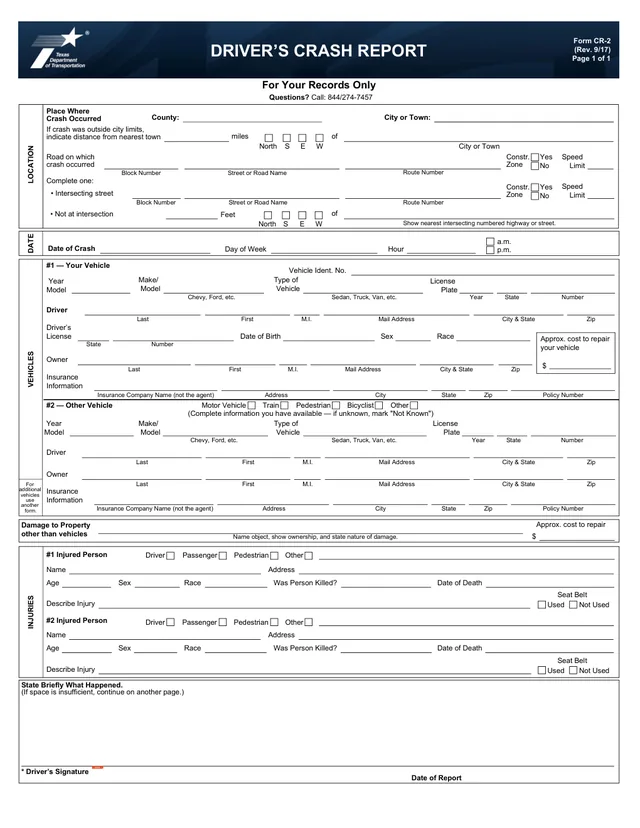
This form is to be used when the driver of a motor vehicle is involved in a crash not investigated by a law enforcement officer that results in injury to or death of any person, or damage to the property of any one person, including the driver, to the apparent extent of at least one thousand dollars ($1,000).
Who Should Complete a Driver's Crash Report (form CR-2)? The Driver's Crash Report is completed and signed by the driver of the vehicle involved in the crash. If the driver is unable to complete the report, another person may complete the report on behalf of the driver, with an explanation as to why the driver was unable to complete the form.
IMPORTANT NOTE: Effective September 1, 2017, per the 85th Texas Legislature Senate Bill 312,
Driver's Crash Reports (form CR-2) are no longer retained by the Texas Department of Transportation.
The drivers involved in a crash not investigated by a Peace Officer should retain this form for their records.
In this portion of the form, the Driver should sign and date the report.
SIGNATURE
In this portion of the form, state factual information as to what happened.
DRIVER'S
STATEMENT
In the portion titled #1 Injured Person, select the position
How to fill it
Fill or edit this form in MePDF
- Preview page 2 to confirm the form name and revision.
- Select Fill form to answer the form one page at a time.
- Type an answer for each field; checkboxes and choices use the form’s own options.
- Preview the finished pages, then download the flattened PDF.
- The downloaded copy is image-only, so it cannot be edited as a form again.
Fill only the fields that apply and keep a copy of the finished PDF. The editor keeps the original layout while you fill the existing fields.