What's inside
Form content
Form H1857, 5-2016-E
(Client Name and Address)
Date
Caseworker
Office Address and Phone No. with Area Code
Name of Client
Case No.
Address (Street, City, State and ZIP Code)
The person named above reports renting this residence from you. To correctly evaluate the household's situation, the department needs your assistance.
Please complete the information requested on the back of this letter and return it to me in the postage paid envelope provided.
Please return it as soon as possible, but no later than
Date
.
I hereby give my permission to release the information requested on this form.
Signature
Date
May 2016-E
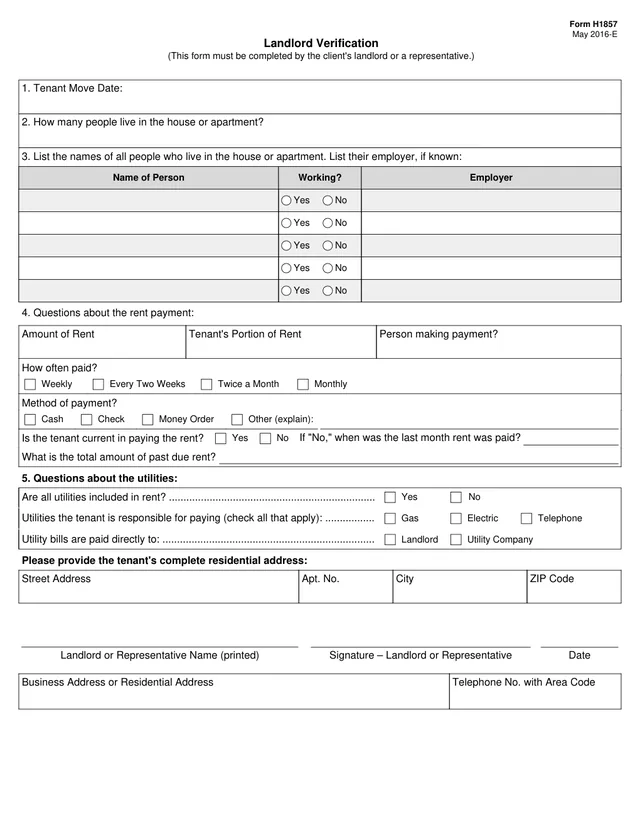
Landlord Verification
(This form must be completed by the client's landlord or a representative.)
1. Tenant Move Date:
2. How many people live in the house or apartment?
3. List the names of all people who live in the house or apartment. List their employer, if known:
Name of Person
Working?
Employer
Yes
No
Yes
No
Yes
No
Yes
No
Yes
No
4. Questions about the rent payment:
Amount of Rent
Tenant's Portion of Rent
Person making payment?
How often paid?
Weekly
Every Two Weeks
Twice a Month
Monthly
Method of payment?
Cash
Check
Money Order
Other (explain):
Is the tenant current
How to fill it
Fill or edit this form in MePDF
- Preview page 2 to confirm the form name and revision.
- Select Fill form to answer the form one page at a time.
- Type an answer for each field; checkboxes and choices use the form’s own options.
- Preview the finished pages, then download the flattened PDF.
- The downloaded copy is image-only, so it cannot be edited as a form again.
Fill only the fields that apply and keep a copy of the finished PDF. The editor keeps the original layout while you fill the existing fields.