What's inside
Form content
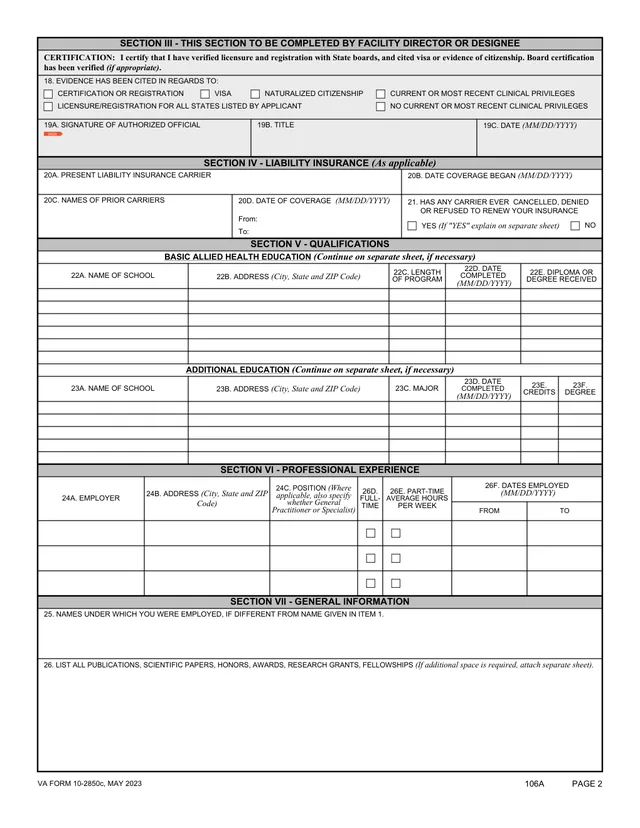
SECTION I - ACTIVE MILITARY DUTY
SECTION II - LICENSURE, DEA CERTIFICATION, REGISTRATION AND CLINICAL PRIVILEGES (As applicable)
OMB Control No. 2900-0205
Estimated Burden: 30 minutes
Expiration Date: 05/31/2026
APPLICATION FOR ASSOCIATED HEALTH OCCUPATIONS
SEE LAST PAGE FOR PAPERWORK REDUCTION ACT, PRIVACY ACT AND INFORMATION ABOUT DISCLOSURE OF YOUR SOCIAL SECURITY NUMBER.
Please submit this application furnishing all information in sufficient detail to enable the Department of Veterans Affairs to determine your eligibility for appointment in Veterans Health Administration. Type, or print in ink. If additional space is required, please attach a separate sheet and refer to items being answered by number.
1. OCCUPATION FOR WHICH APPLYING
2. NAME (Last, First, Middle)
3. APPLICATION FOR (Check one)
4. PRESENT ADDRESS (Include ZIP Code)
STREET ADDRESS 2
APT. NO.
CITY
STATE
ZIP CODE
COUNTRY
5. TELEPHONE NUMBER (Include Area Code)
5A. RESlDENCE
5B. BUSINESS
6. DATE OF BIRTH
(MM/DD/YYYY)
7. PLACE OF BIRTH (City)
STATE
8. SOCIAL SECURITY NUMBER
9A. CITIZENSHIP
9B. COUNTRY OF WHICH YOU ARE A CITIZEN
10A. HAVE YOU EVER FILED APPLICATION FOR APPOINTMENT IN THE VA
10B. NAME OF OFFICE WHERE F
How to fill it
Fill or edit this form in MePDF
- Preview page 2 to confirm the form name and revision.
- Select Fill form to answer the form one page at a time.
- Type an answer for each field; checkboxes and choices use the form’s own options.
- Preview the finished pages, then download the flattened PDF.
- The downloaded copy is image-only, so it cannot be edited as a form again.
Fill only the fields that apply and keep a copy of the finished PDF. The editor keeps the original layout while you fill the existing fields.