What's inside
Form content
2026
Employee’s Withholding Certificate
Complete Form W-4 so that your employer can withhold the correct federal income tax from your pay.
Give Form W-4 to your employer.
Your withholding is subject to review by the IRS.
Step 1:
Enter
Personal
Information
(a) First name and middle initial
Last name
Address
City or town, state, and ZIP code
(b) Social security number
Does your name match the name on your social security card? If not, to ensure you get credit for your earnings, contact SSA at 800-772-1213 or go to www.ssa.gov.
(c)
Single or Married filing separately
Married filing jointly or Qualifying surviving spouse
Head of household (Check only if you’re unmarried and pay more than half the costs of keeping up a home for yourself and a qualifying individual.)
Caution: To claim certain credits or deductions on your tax return, you (and/or your spouse if married filing jointly) are required to have a social security number valid for employment. See page 2 for more information.
TIP: Consider using the estimator at www.irs.gov/W4App to determine the most accurate withholding for the rest of the year if you:
are completing this form after the beginning of the year; expect to work only
How to fill it
Fill or edit this form in MePDF
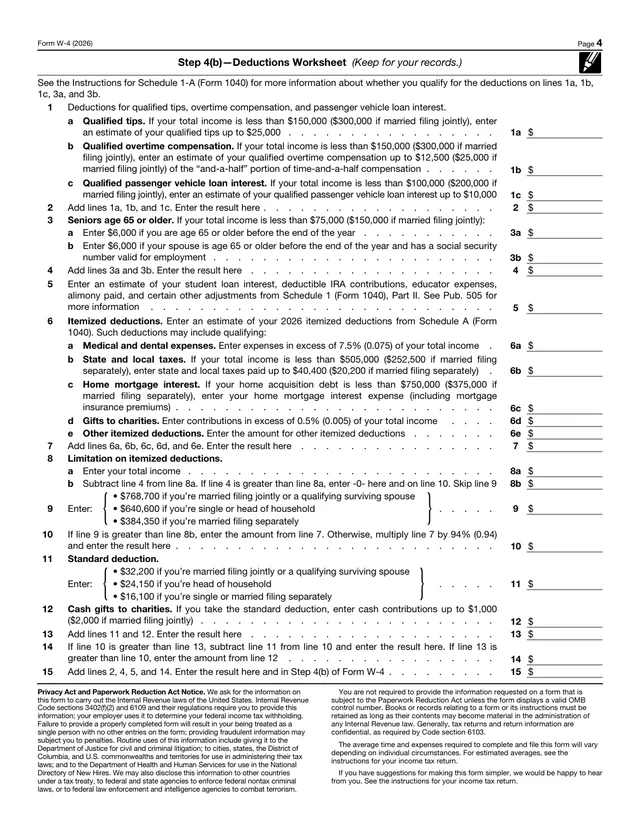
- Preview page 4 to confirm the form name and revision.
- Select Fill form to answer the form one page at a time.
- Type an answer for each field; checkboxes and choices use the form’s own options.
- Preview the finished pages, then download the flattened PDF.
- The downloaded copy is image-only, so it cannot be edited as a form again.
Keep the tax year and filing status consistent on every page. The editor keeps the original layout while you fill the existing fields.