What's inside
Form content
(Rev. August 2019)
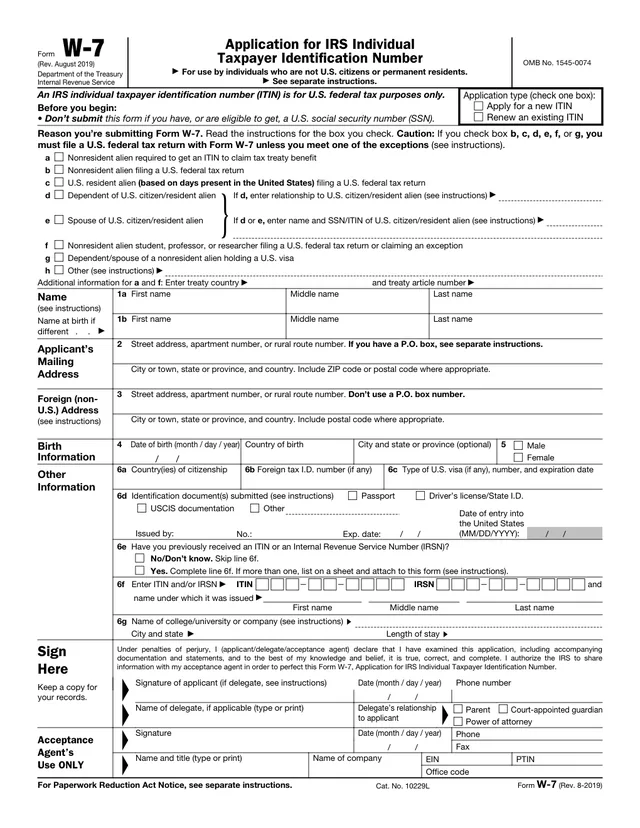
Application for IRS Individual
Taxpayer Identification Number
▶ For use by individuals who are not U.S. citizens or permanent residents.
▶ See separate instructions.
An IRS individual taxpayer identification number (ITIN) is for U.S. federal tax purposes only.
Before you begin:
• Don’t submit this form if you have, or are eligible to get, a U.S. social security number (SSN).
Application type (check one box):
Apply for a new ITIN
Renew an existing ITIN
Reason you’re submitting Form W-7. Read the instructions for the box you check. Caution: If you check box b, c, d, e, f, or g, you must file a U.S. federal tax return with Form W-7 unless you meet one of the exceptions (see instructions).
a
Nonresident alien required to get an ITIN to claim tax treaty benefit b
Nonresident alien filing a U.S. federal tax return c
U.S. resident alien (based on days present in the United States) filing a U.S. federal tax return d
Dependent of U.S. citizen/resident alien e
Spouse of U.S. citizen/resident alien }
If d, enter relationship to U.S. citizen/resident alien (see instructions) ▶
If d or e, enter name and SSN/ITIN of U.S. citizen/resident alien (see instructions) ▶ f
Nonresiden
How to fill it
Fill or edit this form in MePDF
- Preview page 1 to confirm the form name and revision.
- Select Fill form to answer the form one page at a time.
- Type an answer for each field; checkboxes and choices use the form’s own options.
- Preview the finished pages, then download the flattened PDF.
- The downloaded copy is image-only, so it cannot be edited as a form again.
Fill only the fields that apply and keep a copy of the finished PDF. The editor keeps the original layout while you fill the existing fields.