What's inside
Form content
(Rev. October 2023)
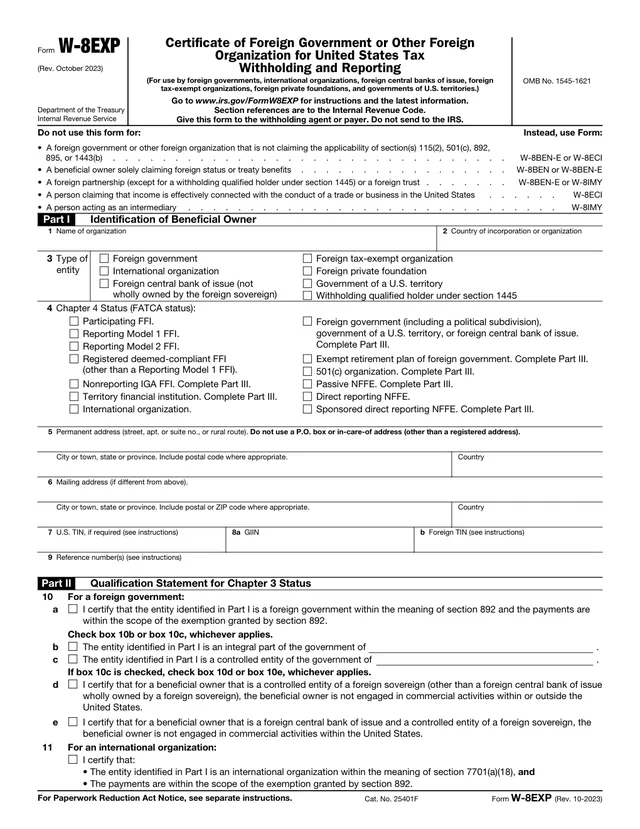
Certificate of Foreign Government or Other Foreign
Organization for United States Tax
Withholding and Reporting
(For use by foreign governments, international organizations, foreign central banks of issue, foreign tax-exempt organizations, foreign private foundations, and governments of U.S. territories.)
Go to www.irs.gov/FormW8EXP for instructions and the latest information.
Section references are to the Internal Revenue Code.
Give this form to the withholding agent or payer. Do not send to the IRS.
Do not use this form for:
Instead, use Form:
• A foreign government or other foreign organization that is not claiming the applicability of section(s) 115(2), 501(c), 892,
895, or 1443(b)
.
.
.
.
.
.
.
.
.
.
.
.
.
.
.
.
.
.
.
.
.
.
.
.
.
.
.
.
.
.
.
.
W-8BEN-E or W-8ECI
• A beneficial owner solely claiming foreign status or treaty benefits
.
.
.
.
.
.
.
.
.
.
.
.
.
.
.
.
.
W-8BEN or W-8BEN-E
• A foreign partnership (except for a withholding qualified holder under section 1445) or a foreign trust .
.
.
.
.
.
.
W-8BEN-E or W-8IMY
• A person claiming that income is effectively connected with the conduct of a trade or business in the United States
.
.
.
.
.
.
W-8ECI
•
How to fill it
Fill or edit this form in MePDF
- Preview page 1 to confirm the form name and revision.
- Select Fill form to answer the form one page at a time.
- Type an answer for each field; checkboxes and choices use the form’s own options.
- Preview the finished pages, then download the flattened PDF.
- The downloaded copy is image-only, so it cannot be edited as a form again.
Keep the tax year and filing status consistent on every page. The editor keeps the original layout while you fill the existing fields.