What's inside
Form content
HOW TO APPLY FOR A PO BOX
Many people have discovered that Post Office Box™ service is a safe, convenient way to receive their mail. Learn all about PO Box™ service on the first two pages of this form. Then, decide whether to apply online or at a Post Office™.
SELECT A PO BOX SIZE
Across the U.S., Postal Service™ PO Boxes are available in five sizes.
However, not all Post Office locations have every size. Be sure to select the right size for your mail volume and schedule.
Our smallest box (Size 1) fits 10–15 letter-sized envelopes or up to two rolled magazines. Start with a Size 2 box if you receive more than
15 mailpieces a week. Size 3, 4, or 5 is recommended if you receive magazines and catalogs.
Size 1:
3" X 5.5"
Size 4:
11" X 11"
Size 2:
5" X 5.5"
Size 3:
11" X 5.5"
Size 5:
22.5" X 12"
It’s easy to find a box that’s right for you. Find an available PO Box by going to www.usps.com/poboxes.
If you need more room than our largest box provides, ask at your local
Post Office about Business Mail Pickup (Caller) Service.
FEES
To find a PO Box in your area and get fee information, visit www.usps.com/poboxes. You may pay your initial PO Box fees online or at the Post Office where the P
How to fill it
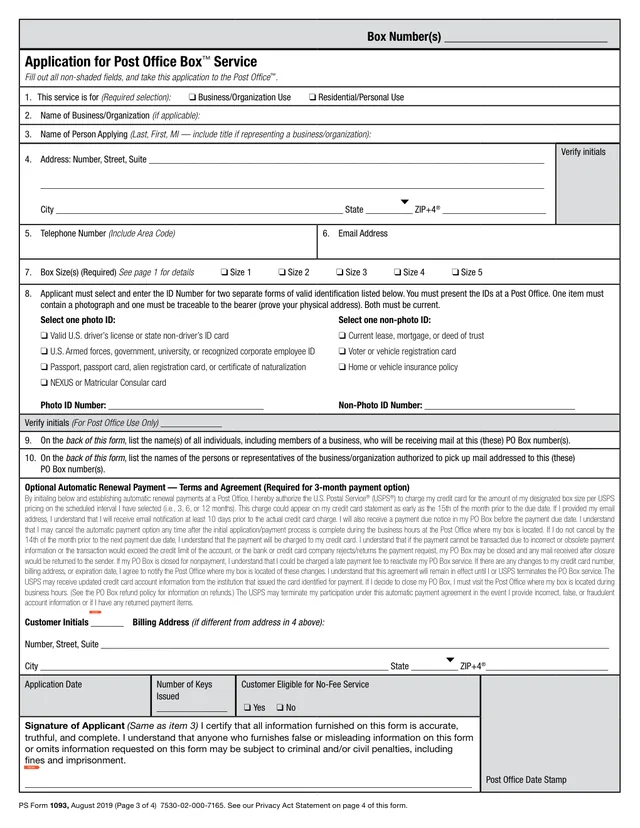
Fill or edit this form in MePDF
- Preview page 3 to confirm the form name and revision.
- Select Fill form to answer the form one page at a time.
- Type an answer for each field; checkboxes and choices use the form’s own options.
- Preview the finished pages, then download the flattened PDF.
- The downloaded copy is image-only, so it cannot be edited as a form again.
Fill only the fields that apply and keep a copy of the finished PDF. The editor keeps the original layout while you fill the existing fields.