What's inside
Form content
70000112250094
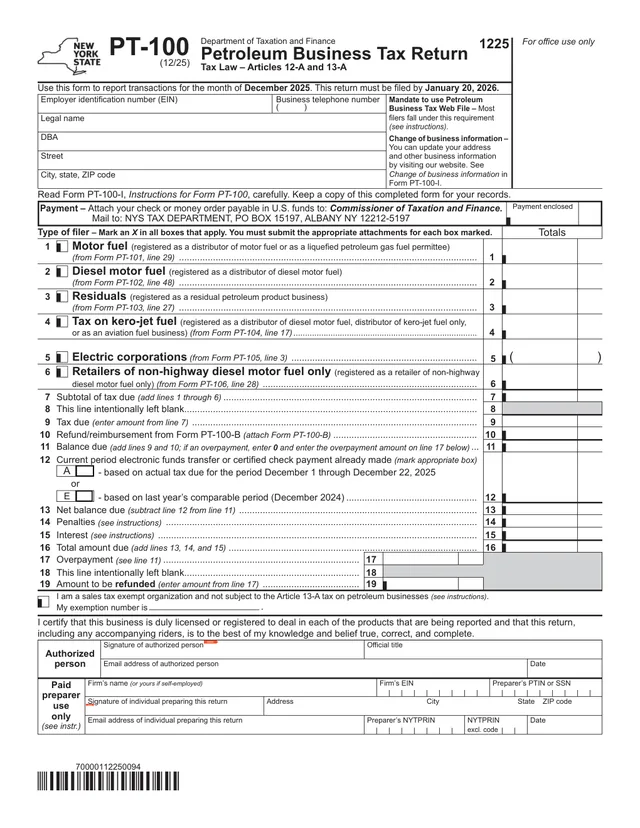
7 Subtotal of tax due (add lines 1 through 6) .................................................................................................
7
8 This line intentionally left blank................................................................................................................
8
9 Tax due (enter amount from line 7) .............................................................................................................
9
10 Refund/reimbursement from Form PT-100-B (attach Form PT-100-B) ....................................................... 10
11 Balance due (add lines 9 and 10; if an overpayment, enter 0 and enter the overpayment amount on line 17 below) ... 11
12 Current period electronic funds transfer or certified check payment already made (mark appropriate box)
A
- based on actual tax due for the period December 1 through December 22, 2025 or
E
- based on last year’s comparable period (December 2024) .................................................. 12
13 Net balance due (subtract line 12 from line 11) ........................................................................................... 13
14 Penalties (see instructions) ............
How to fill it
Fill or edit this form in MePDF
- Preview page 1 to confirm the form name and revision.
- Select Fill form to answer the form one page at a time.
- Type an answer for each field; checkboxes and choices use the form’s own options.
- Preview the finished pages, then download the flattened PDF.
- The downloaded copy is image-only, so it cannot be edited as a form again.
Keep the tax year and filing status consistent on every page. The editor keeps the original layout while you fill the existing fields.