What's inside
Form content
Protected B when completed
RC4288 E (25)
(Ce formulaire est disponible en français.)
Taxpayer Relief Request – Cancel or Waive Penalties and Interest
Use this form to request relief of penalties and interest if you were unable to meet your tax obligations due to circumstances beyond your control. To learn more about taxpayer relief, go to: canada.ca/penalty-interest-relief.
If you are not sure whether this is the right form for your situation, use the Self-Evaluation and Learning Tool (SELT): canada.ca/taxpayer-relief-self-evaluation.
You may also call 1-800-959-8281 (individual) or 1-800-959-5525 (business and self-employed).
Section 1 – Taxpayer identification
Taxpayer name:
Mailing address:
City, town or community:
Province, territory or state:
Postal or
ZIP code:
Country (if other than Canada):
Telephone number:
Alternate telephone number:
Section 2 – Authorized representative identification
Are you submitting this form on behalf of someone else?
Yes
No
Are you a representative with at least level 2 authorization for all the accounts involved in this relief request?
Note: Level 2 authorization allows you to view and update certain information.
Yes
No
If no, you cannot submit th
How to fill it
Fill or edit this form in MePDF
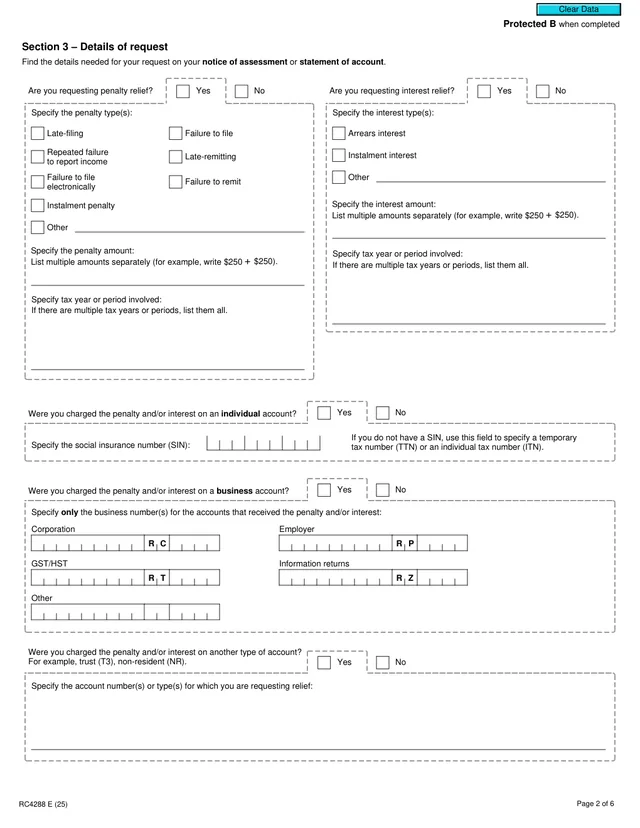
- Preview page 2 to confirm the form name and revision.
- Select Fill form to answer the form one page at a time.
- Type an answer for each field; checkboxes and choices use the form’s own options.
- Preview the finished pages, then download the flattened PDF.
- The downloaded copy is image-only, so it cannot be edited as a form again.
Keep the tax year and filing status consistent on every page. The editor keeps the original layout while you fill the existing fields.