What's inside
Form content
Protected B when completed
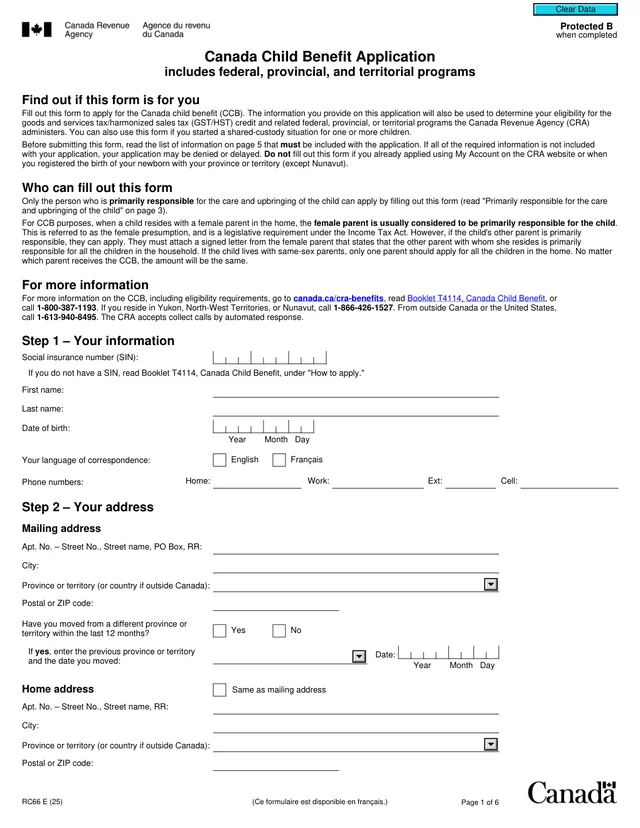
Canada Child Benefit Application includes federal, provincial, and territorial programs
Find out if this form is for you
Fill out this form to apply for the Canada child benefit (CCB). The information you provide on this application will also be used to determine your eligibility for the goods and services tax/harmonized sales tax (GST/HST) credit and related federal, provincial, or territorial programs the Canada Revenue Agency (CRA) administers. You can also use this form if you started a shared-custody situation for one or more children.
Before submitting this form, read the list of information on page 5 that must be included with the application. If all of the required information is not included with your application, your application may be denied or delayed. Do not fill out this form if you already applied using My Account on the CRA website or when you registered the birth of your newborn with your province or territory (except Nunavut).
Who can fill out this form
Only the person who is primarily responsible for the care and upbringing of the child can apply by filling out this form (read "Primarily responsible for the care and upbringing of the c
How to fill it
Fill or edit this form in MePDF
- Preview page 1 to confirm the form name and revision.
- Select Fill form to answer the form one page at a time.
- Type an answer for each field; checkboxes and choices use the form’s own options.
- Preview the finished pages, then download the flattened PDF.
- The downloaded copy is image-only, so it cannot be edited as a form again.
Copy figures exactly from the statement and keep the currency clear. The editor keeps the original layout while you fill the existing fields.