What's inside
Form content
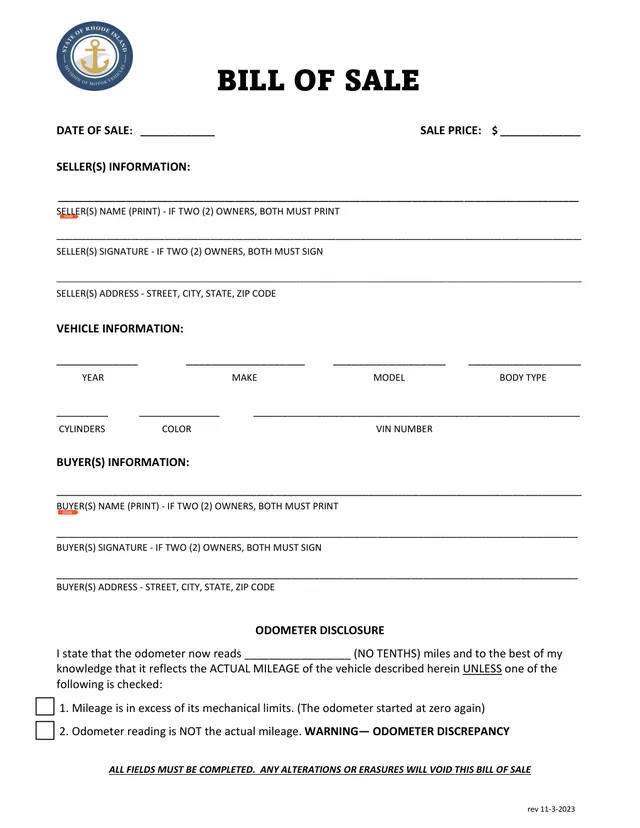
BILL OF SALE rev 11-3-2023
DATE OF SALE: _____________ SALE PRICE: $ ______________
SELLER(S) INFORMATION:
____________________________________________________________________________________________________
SELLER(S) NAME (PRINT) - IF TWO (2) OWNERS, BOTH MUST PRINT
______________________________________________________________________________________________________________________________
SELLER(S) SIGNATURE - IF TWO (2) OWNERS, BOTH MUST SIGN
________________________________________________________________________________________________________________________________________________________________________
SELLER(S) ADDRESS - STREET, CITY, STATE, ZIP CODE
VEHICLE INFORMATION:
_____________ ___________________ __________________ __________________
YEAR MAKE MODEL BODY TYPE
_________ ______________ _________________________________________________________
CYLINDERS COLOR VIN NUMBER
BUYER(S) INFORMATION:
____________________________________________________________________________________
BUYER(S) NAME (PRINT) - IF TWO (2) OWNERS, BOTH MUST PRINT
___________________________________________________________________________________________
BUYER(S) SIGNATURE - IF TWO (2) OWNERS, BOT
How to fill it
Fill or edit this form in MePDF
- Preview page 1 to confirm the form name and revision.
- Select Fill form to answer the form one page at a time.
- Type an answer for each field; checkboxes and choices use the form’s own options.
- Preview the finished pages, then download the flattened PDF.
- The downloaded copy is image-only, so it cannot be edited as a form again.
Fill only the fields that apply and keep a copy of the finished PDF. The editor keeps the original layout while you fill the existing fields.