What's inside
Form content
(Form 1040)
2025
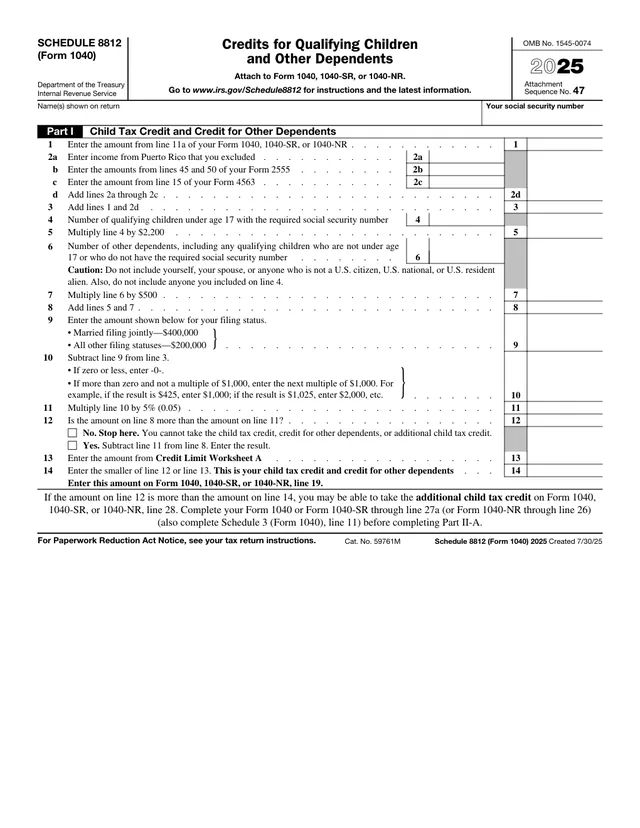
Credits for Qualifying Children and Other Dependents
Attach to Form 1040, 1040-SR, or 1040-NR.
Go to www.irs.gov/Schedule8812 for instructions and the latest information.
Attachment
Sequence No. 47
Name(s) shown on return
Your social security number
Part I
Child Tax Credit and Credit for Other Dependents
1
Enter the amount from line 11a of your Form 1040, 1040-SR, or 1040-NR .
.
.
.
.
.
.
.
.
.
.
.
1
2a
Enter income from Puerto Rico that you excluded .
.
.
.
.
.
.
.
.
.
.
2a b
Enter the amounts from lines 45 and 50 of your Form 2555
.
.
.
.
.
.
.
.
2b c
Enter the amount from line 15 of your Form 4563 .
.
.
.
.
.
.
.
.
.
.
2c d
Add lines 2a through 2c .
.
.
.
.
.
.
.
.
.
.
.
.
.
.
.
.
.
.
.
.
.
.
.
.
.
.
2d
3
Add lines 1 and 2d
.
.
.
.
.
.
.
.
.
.
.
.
.
.
.
.
.
.
.
.
.
.
.
.
.
.
.
.
3
4
Number of qualifying children under age 17 with the required social security number
4
5
Multiply line 4 by $2,200
.
.
.
.
.
.
.
.
.
.
.
.
.
.
.
.
.
.
.
.
.
.
.
.
.
.
5
6
Number of other dependents, including any qualifying children who are not under age
17 or who do not have the required social security number
.
.
.
.
.
.
.
.
6
Caution: Do not include yourself, your spouse, or anyone
How to fill it
Fill or edit this form in MePDF
- Preview page 1 to confirm the form name and revision.
- Select Fill form to answer the form one page at a time.
- Type an answer for each field; checkboxes and choices use the form’s own options.
- Preview the finished pages, then download the flattened PDF.
- The downloaded copy is image-only, so it cannot be edited as a form again.
Keep the tax year and filing status consistent on every page. The editor keeps the original layout while you fill the existing fields.