What's inside
Form content
(Form 1120)
(Rev. December 2019)
Net Income (Loss) Reconciliation for Corporations
With Total Assets of $10 Million or More
▶ Attach to Form 1120 or 1120-C.
▶ Go to www.irs.gov/Form1120 for instructions and the latest information.
Name of corporation (common parent, if consolidated return)
Employer identification number
Check applicable box(es):
(1)
Non-consolidated return
(2)
Consolidated return (Form 1120 only)
(3)
Mixed 1120/L/PC group
(4)
Dormant subsidiaries schedule attached
Part I
Financial Information and Net Income (Loss) Reconciliation (see instructions)
1 a
Did the corporation file SEC Form 10-K for its income statement period ending with or within this tax year?
Yes.
Skip lines 1b and 1c and complete lines 2a through 11 with respect to that SEC Form 10-K.
No.
Go to line 1b. See instructions if multiple non-tax-basis income statements are prepared.
b Did the corporation prepare a certified audited non-tax-basis income statement for that period?
Yes.
Skip line 1c and complete lines 2a through 11 with respect to that income statement.
No.
Go to line 1c.
c Did the corporation prepare a non-tax-basis income statement for that period?
Yes.
Complete lines 2a through 11 with re
How to fill it
Fill or edit this form in MePDF
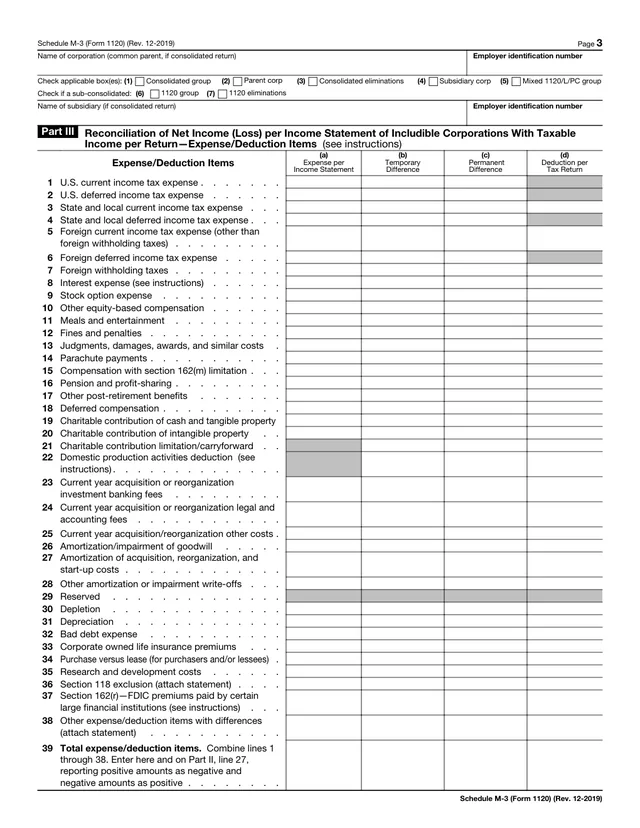
- Preview page 3 to confirm the form name and revision.
- Select Fill form to answer the form one page at a time.
- Type an answer for each field; checkboxes and choices use the form’s own options.
- Preview the finished pages, then download the flattened PDF.
- The downloaded copy is image-only, so it cannot be edited as a form again.
Keep the tax year and filing status consistent on every page. The editor keeps the original layout while you fill the existing fields.