What's inside
Form content
(Form 1120)
2025
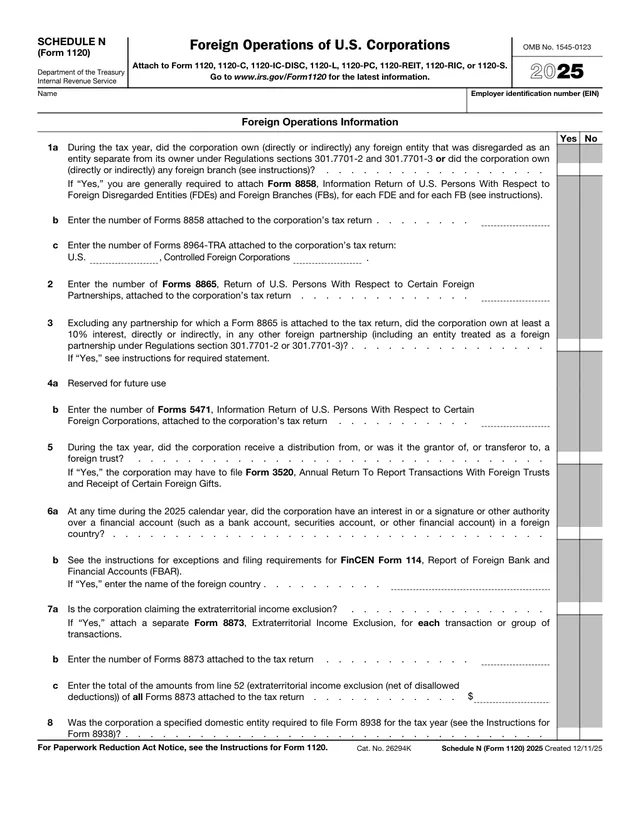
Foreign Operations of U.S. Corporations
Attach to Form 1120, 1120-C, 1120-IC-DISC, 1120-L, 1120-PC, 1120-REIT, 1120-RIC, or 1120-S.
Go to www.irs.gov/Form1120 for the latest information.
Name
Employer identification number (EIN)
Foreign Operations Information
1 a
During the tax year, did the corporation own (directly or indirectly) any foreign entity that was disregarded as an entity separate from its owner under Regulations sections 301.7701-2 and 301.7701-3 or did the corporation own
(directly or indirectly) any foreign branch (see instructions)?
.
.
.
.
.
.
.
.
.
.
.
.
.
.
.
.
.
.
Yes
No
If “Yes,” you are generally required to attach Form 8858, Information Return of U.S. Persons With Respect to
Foreign Disregarded Entities (FDEs) and Foreign Branches (FBs), for each FDE and for each FB (see instructions).
b
Enter the number of Forms 8858 attached to the corporation’s tax return .
.
.
.
.
.
.
.
c
Enter the number of Forms 8964-TRA attached to the corporation’s tax return:
U.S.
, Controlled Foreign Corporations
.
2
Enter the number of Forms 8865, Return of U.S. Persons With Respect to Certain Foreign
Partnerships, attached to the corporation’s tax return .
.
.
.
.
How to fill it
Fill or edit this form in MePDF
- Preview page 1 to confirm the form name and revision.
- Select Fill form to answer the form one page at a time.
- Type an answer for each field; checkboxes and choices use the form’s own options.
- Preview the finished pages, then download the flattened PDF.
- The downloaded copy is image-only, so it cannot be edited as a form again.
Keep the tax year and filing status consistent on every page. The editor keeps the original layout while you fill the existing fields.