What's inside
Form content
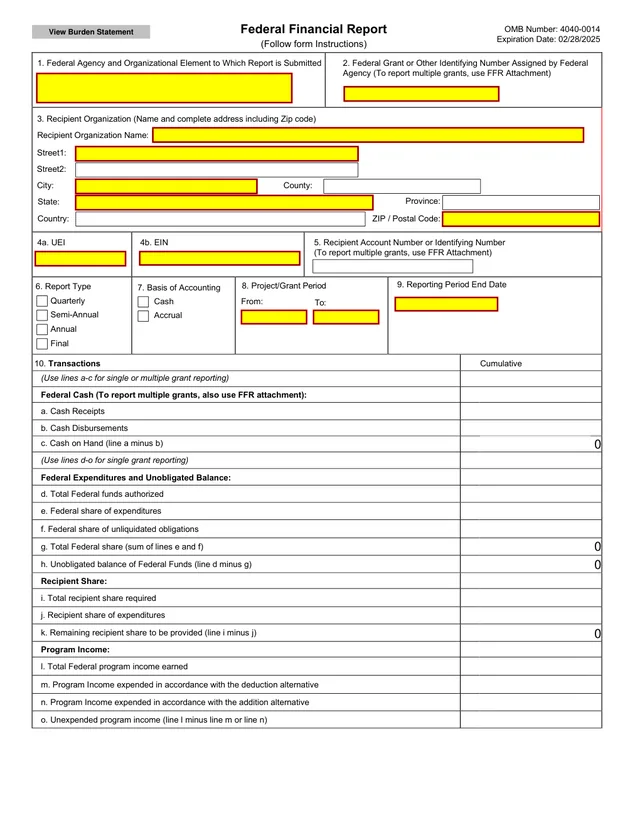
Federal Financial Report
(Follow form Instructions)
OMB Number: 4040-0014
Expiration Date: 02/28/2025
1. Federal Agency and Organizational Element to Which Report is Submitted
2. Federal Grant or Other Identifying Number Assigned by Federal
Agency (To report multiple grants, use FFR Attachment)
3. Recipient Organization (Name and complete address including Zip code)
Recipient Organization Name:
Street1:
Street2:
City:
County:
State:
Province:
Country:
ZIP / Postal Code:
4a. UEI
4b. EIN
5. Recipient Account Number or Identifying Number
(To report multiple grants, use FFR Attachment)
6. Report Type
Quarterly
Semi-Annual
Annual
Final
7. Basis of Accounting
Cash
Accrual
8. Project/Grant Period
From:
To:
9. Reporting Period End Date
10. Transactions
Cumulative
(Use lines a-c for single or multiple grant reporting)
Federal Cash (To report multiple grants, also use FFR attachment):
a. Cash Receipts b. Cash Disbursements c. Cash on Hand (line a minus b)
(Use lines d-o for single grant reporting)
Federal Expenditures and Unobligated Balance:
d. Total Federal funds authorized e. Federal share of expenditures f. Federal share of unliquidated obligations g. Total Federal share (sum of lines e
How to fill it
Fill or edit this form in MePDF
- Preview page 1 to confirm the form name and revision.
- Select Fill form to answer the form one page at a time.
- Type an answer for each field; checkboxes and choices use the form’s own options.
- Preview the finished pages, then download the flattened PDF.
- The downloaded copy is image-only, so it cannot be edited as a form again.
Copy figures exactly from the statement and keep the currency clear. The editor keeps the original layout while you fill the existing fields.