What's inside
Form content
10000102250094
1
1a
.00
.00
New York State and Local
Annual Sales and Use Tax Return
Department of Taxation and Finance
Annual ST-101
Sales tax identification number
Legal name (Print ID number and legal name as it appears on the Certificate of Authority)
DBA (doing business as) name
Number and street
City, state, ZIP code
Proceed to Step 3, page 2
For office use only
Is this your final return? – If you sell or discontinue your business, or change the form of your business, you are required to file a final return with the applicable information completed in Step 2 below. You must file your final return within 20 days of the last day of business or change in status. The return should include the tax due from business operations to the last day of business, as well as any tax collected on assets that you sell. Mark an X in the box if this is your final return. ............................................................................
A25
Step 1 Return summary
(see instructions)
ST-101 (2/25) Page 1 of 4
Mandate to use Sales Tax Web File
Most filers fall under this requirement.
See Form ST-101-I, Instructions for
Has your address or business information changed?
Mark an X in the
How to fill it
Fill or edit this form in MePDF
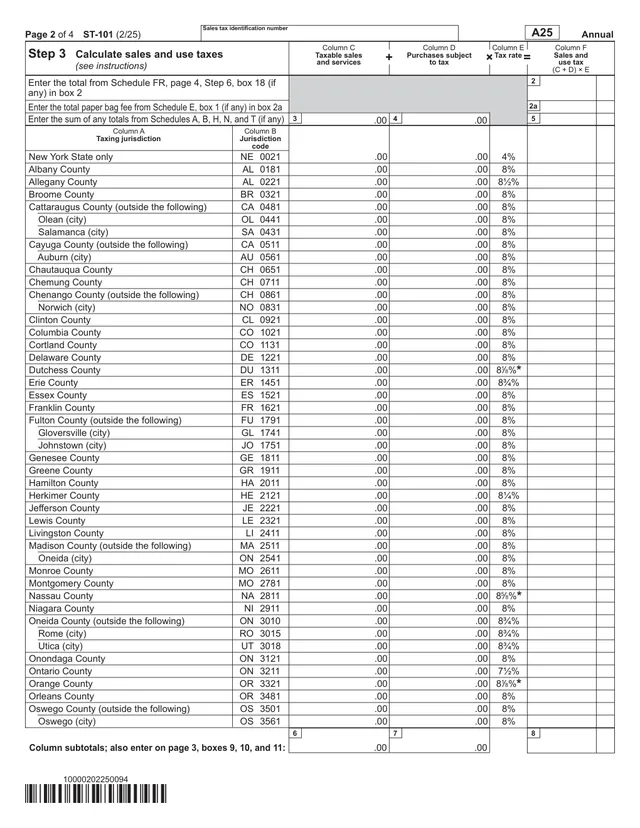
- Preview page 2 to confirm the form name and revision.
- Select Fill form to answer the form one page at a time.
- Type an answer for each field; checkboxes and choices use the form’s own options.
- Preview the finished pages, then download the flattened PDF.
- The downloaded copy is image-only, so it cannot be edited as a form again.
Keep the tax year and filing status consistent on every page. The editor keeps the original layout while you fill the existing fields.