What's inside
Form content
Moving Expenses Deduction
Claiming moving expenses
You can claim eligible moving expenses if one of the following applies:
• You moved to a new home to work or to run a business out of a new location
• You moved to be a student in full-time attendance in a post-secondary program at a university, college or other educational institution
Complete Part 2 of Form T1-M, Moving Expenses Deduction, to determine if you meet the distance requirement to claim your moving expenses. To qualify, your new home must be at least 40 kilometres closer (by the shortest public route) to your new work location or school.
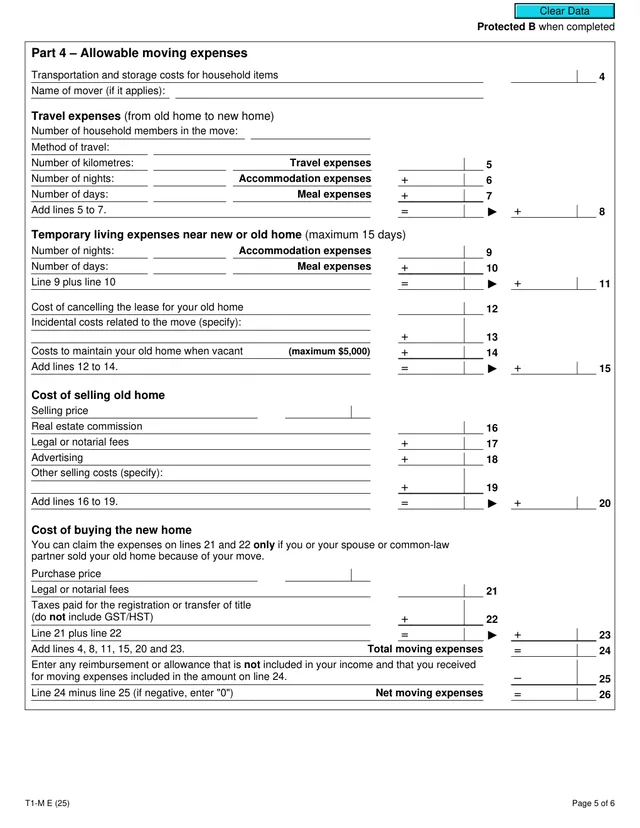
You must complete a separate Form T1-M for each eligible move. Enter the total from line 29 in Part 4 of each form on line 21900 of your Income Tax and Benefit Return.
Employed or self-employed
If you are employed or self-employed, you can deduct eligible moving expenses from the employment or self-employment income you earned at your new work location, including amounts you received under the Wage Earner Protection
Program for your employment at the new work location.
You cannot deduct moving expenses from any other type of income, such as investment income or employment insurance ben
How to fill it
Fill or edit this form in MePDF
- Preview page 5 to confirm the form name and revision.
- Select Fill form to answer the form one page at a time.
- Type an answer for each field; checkboxes and choices use the form’s own options.
- Preview the finished pages, then download the flattened PDF.
- The downloaded copy is image-only, so it cannot be edited as a form again.
Keep the tax year and filing status consistent on every page. The editor keeps the original layout while you fill the existing fields.