What's inside
Form content
2025
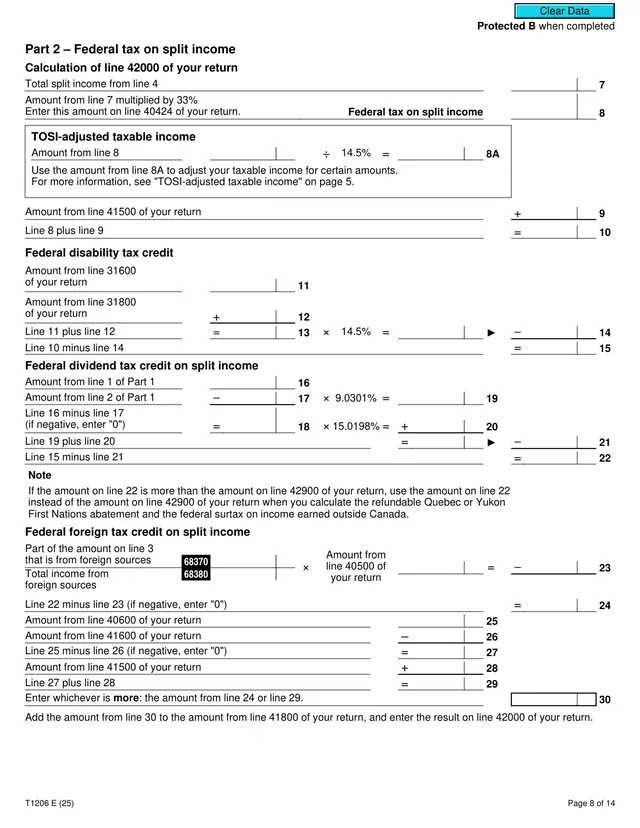
Tax on Split Income
Complete Form T1206, Tax on Split Income (TOSI) if any of the following applies:
• you are a specified individual, have split income in the tax year, and the income is not an excluded amount
• you claimed a reserve on line C of your 2024 Form T1206
You are a specified individual if you were a resident of Canada at the end of the tax year, or in the case of a deceased individual, the individual was a resident of Canada immediately before their death. If you were under 18 years of age at the end of the year, at least one of your parents must have also been a resident of Canada at any time in the year. For excluded amounts and definitions, see page 2.
Split income
Split income includes the following amounts:
• taxable dividends on shares of a corporation (other than shares of a class listed on a designated stock exchange and those of a mutual fund corporation), that you received directly, or through a partnership or a trust (other than a mutual fund trust)
• shareholder benefits from the ownership of shares of a corporation (other than shares of a class listed on a designated stock exchange), conferred on you directly, or through a partnership or a trust (othe
How to fill it
Fill or edit this form in MePDF
- Preview page 8 to confirm the form name and revision.
- Select Fill form to answer the form one page at a time.
- Type an answer for each field; checkboxes and choices use the form’s own options.
- Preview the finished pages, then download the flattened PDF.
- The downloaded copy is image-only, so it cannot be edited as a form again.
Keep the tax year and filing status consistent on every page. The editor keeps the original layout while you fill the existing fields.