What's inside
Form content
Protected B when completed
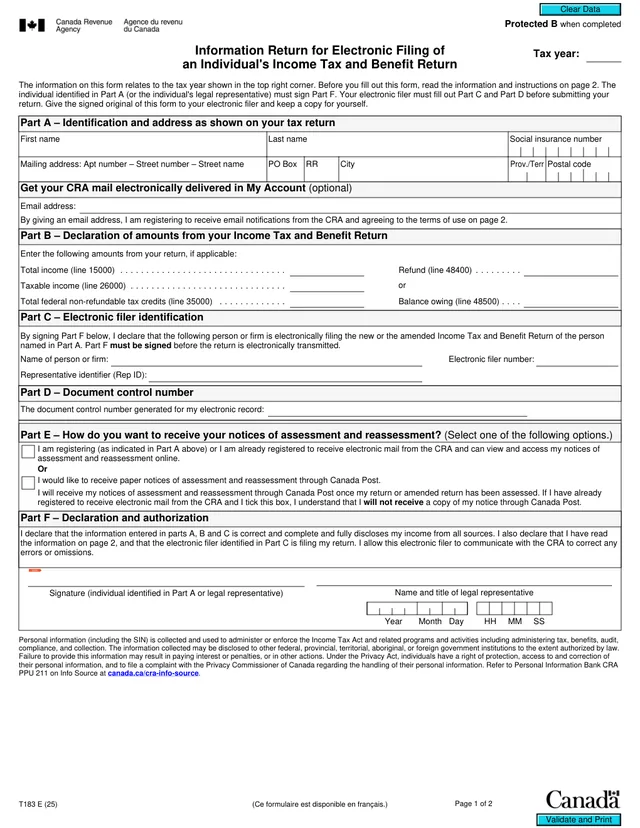
Information Return for Electronic Filing of an Individual's Income Tax and Benefit Return
Tax year:
The information on this form relates to the tax year shown in the top right corner. Before you fill out this form, read the information and instructions on page 2. The individual identified in Part A (or the individual's legal representative) must sign Part F. Your electronic filer must fill out Part C and Part D before submitting your return. Give the signed original of this form to your electronic filer and keep a copy for yourself.
Part A – Identification and address as shown on your tax return
First name
Last name
Social insurance number
Mailing address: Apt number – Street number – Street name
PO Box
RR
City
Prov./Terr Postal code
Get your CRA mail electronically delivered in My Account (optional)
Email address:
By giving an email address, I am registering to receive email notifications from the CRA and agreeing to the terms of use on page 2.
Part B – Declaration of amounts from your Income Tax and Benefit Return
Enter the following amounts from your return, if applicable:
Total income (line 15000) . . . . . . . . . . . . . . . . . . . . . . . . . . .
How to fill it
Fill or edit this form in MePDF
- Preview page 1 to confirm the form name and revision.
- Select Fill form to answer the form one page at a time.
- Type an answer for each field; checkboxes and choices use the form’s own options.
- Preview the finished pages, then download the flattened PDF.
- The downloaded copy is image-only, so it cannot be edited as a form again.
Keep the tax year and filing status consistent on every page. The editor keeps the original layout while you fill the existing fields.