What's inside
Form content
Protected B when completed
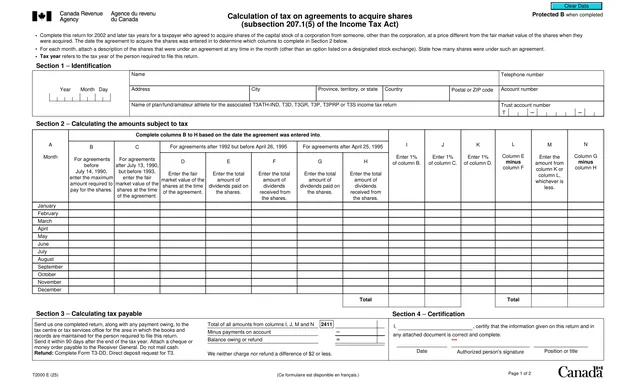
Calculation of tax on agreements to acquire shares
(subsection 207.1(5) of the Income Tax Act)
• Complete this return for 2002 and later tax years for a taxpayer who agreed to acquire shares of the capital stock of a corporation from someone, other than the corporation, at a price different from the fair market value of the shares when they were acquired. The date the agreement to acquire the shares was entered in to determine which columns to complete in Section 2 below.
• For each month, attach a description of the shares that were under an agreement at any time in the month (other than an option listed on a designated stock exchange). State how many shares were under such an agreement.
• Tax year refers to the tax year of the person required to file this return.
Section 1 – Identification
Year Month Day
Name
Telephone number
Address
City
Province, territory, or state
Country
Postal or ZIP code
Account number
Name of plan/fund/amateur athlete for the associated T3ATH-IND, T3D, T3GR, T3P, T3PRP or T3S income tax return
Trust account number
T
–
–
Section 2 – Calculating the amounts subject to tax
A
Month
Complete columns B to H based on the date the agree
How to fill it
Fill or edit this form in MePDF
- Preview page 1 to confirm the form name and revision.
- Select Fill form to answer the form one page at a time.
- Type an answer for each field; checkboxes and choices use the form’s own options.
- Preview the finished pages, then download the flattened PDF.
- The downloaded copy is image-only, so it cannot be edited as a form again.
Keep the tax year and filing status consistent on every page. The editor keeps the original layout while you fill the existing fields.