What's inside
Form content
Protected B when completed
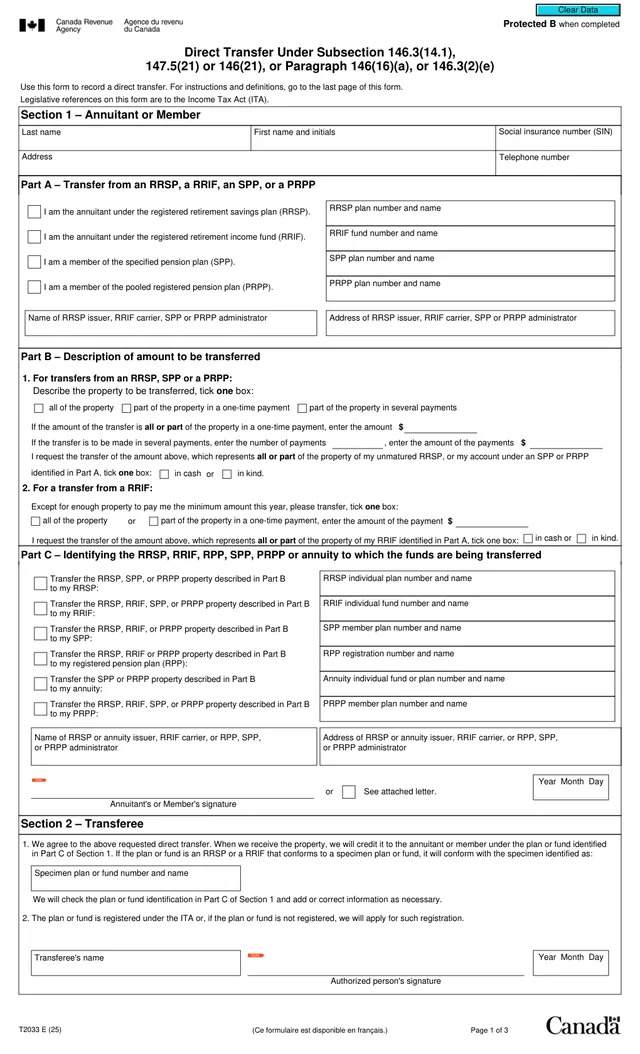
Direct Transfer Under Subsection 146.3(14.1),
147.5(21) or 146(21), or Paragraph 146(16)(a), or 146.3(2)(e)
Use this form to record a direct transfer. For instructions and definitions, go to the last page of this form.
Legislative references on this form are to the Income Tax Act (ITA).
Section 1 – Annuitant or Member
Last name
First name and initials
Social insurance number (SIN)
Address
Telephone number
Part A – Transfer from an RRSP, a RRIF, an SPP, or a PRPP
I am the annuitant under the registered retirement savings plan (RRSP).
RRSP plan number and name
I am the annuitant under the registered retirement income fund (RRIF).
RRIF fund number and name
I am a member of the specified pension plan (SPP).
SPP plan number and name
I am a member of the pooled registered pension plan (PRPP).
PRPP plan number and name
Name of RRSP issuer, RRIF carrier, SPP or PRPP administrator
Address of RRSP issuer, RRIF carrier, SPP or PRPP administrator
Part B – Description of amount to be transferred
1. For transfers from an RRSP, SPP or a PRPP:
Describe the property to be transferred, tick one box:
all of the property part of the property in a one-time payment part of the
How to fill it
Fill or edit this form in MePDF
- Preview page 1 to confirm the form name and revision.
- Select Fill form to answer the form one page at a time.
- Type an answer for each field; checkboxes and choices use the form’s own options.
- Preview the finished pages, then download the flattened PDF.
- The downloaded copy is image-only, so it cannot be edited as a form again.
Copy figures exactly from the statement and keep the currency clear. The editor keeps the original layout while you fill the existing fields.