What's inside
Form content
Protected B when completed
Protégé B une fois rempli
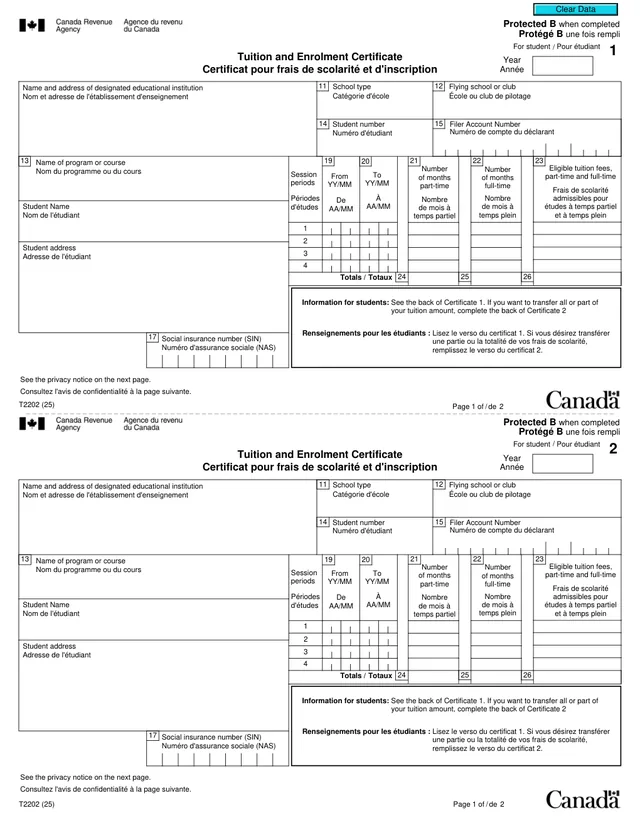
Tuition and Enrolment Certificate
Certificat pour frais de scolarité et d'inscription
For student / Pour étudiant 1
Year
Année
Name and address of designated educational institution
Nom et adresse de l'établissement d'enseignement
11
School type
Catégorie d'école
12
Flying school or club
École ou club de pilotage
13
Name of program or course
Nom du programme ou du cours
14 Student number
Numéro d'étudiant
15
Filer Account Number
Numéro de compte du déclarant
Student Name
Nom de l'étudiant
Student address
Adresse de l'étudiant
17 Social insurance number (SIN)
Numéro d'assurance sociale (NAS)
Session periods
Périodes d'études
19
From
YY/MM
De
AA/MM
20
To
YY/MM
À
AA/MM
21
Number of months part-time
Nombre de mois à temps partiel
22
Number of months full-time
Nombre de mois à temps plein
23
Eligible tuition fees, part-time and full-time
Frais de scolarité admissibles pour études à temps partiel et à temps plein
1
2
3
4
Totals / Totaux 24
25
26
Information for students: See the back of Certificate 1. If you want to transfer all or part of your tuition amount, complete the back of Certificate 2
Renseignements pour les étudiants : Lisez
How to fill it
Fill or edit this form in MePDF
- Preview page 1 to confirm the form name and revision.
- Select Fill form to answer the form one page at a time.
- Type an answer for each field; checkboxes and choices use the form’s own options.
- Preview the finished pages, then download the flattened PDF.
- The downloaded copy is image-only, so it cannot be edited as a form again.
Keep the tax year and filing status consistent on every page. The editor keeps the original layout while you fill the existing fields.