What's inside
Form content
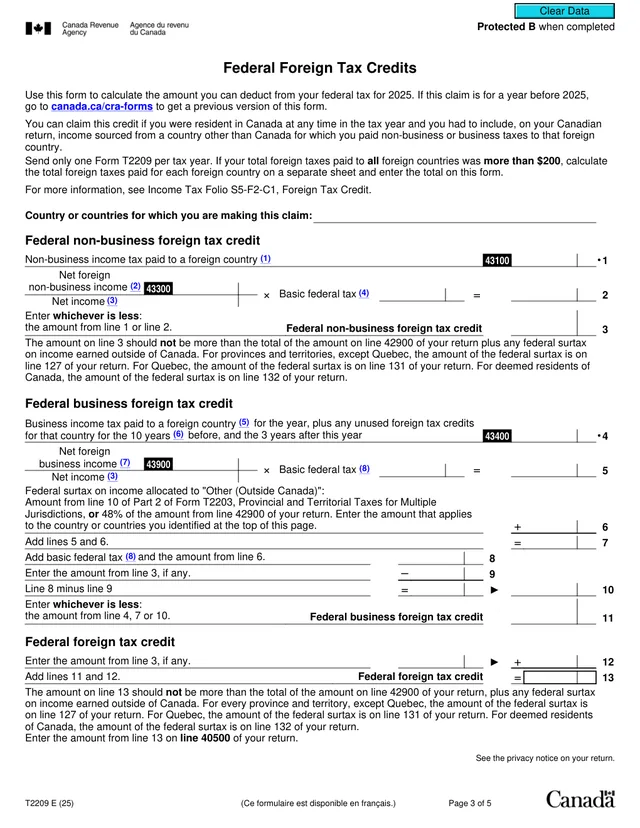
Federal Foreign Tax Credits
General information
This credit is for foreign income or profits taxes you paid on income sourced from a country other than Canada and reported on your Canadian return. Tax treaties with other countries may affect whether you are eligible for this credit.
Notes
You may have deducted an amount on line 25600 of your return for income that is not taxable in Canada under a tax treaty. In this case, do not include that income in your "Net foreign non-business income" (line 43300) or in your
"Net foreign business income" (line 43900). Also, do not include any foreign tax paid on it in your "Non-business income tax paid to a foreign country" (line 43100) or in your "Business income tax paid to a foreign country" (line 43400).
Where a foreign pension income qualifies as pension income eligible for income splitting under the Income Tax Act (ITA) and the pensioner (transferring spouse) and the receiving spouse have jointly elected to split such foreign pension income, any related foreign taxes paid may also be split on the same basis. The total of the split foreign taxes claimed by the pensioner and the receiving spouse cannot be more than the pensioner's total fo
How to fill it
Fill or edit this form in MePDF
- Preview page 3 to confirm the form name and revision.
- Select Fill form to answer the form one page at a time.
- Type an answer for each field; checkboxes and choices use the form’s own options.
- Preview the finished pages, then download the flattened PDF.
- The downloaded copy is image-only, so it cannot be edited as a form again.
Keep the tax year and filing status consistent on every page. The editor keeps the original layout while you fill the existing fields.