What's inside
Form content
Protected B when completed/
Protégé B une fois rempli
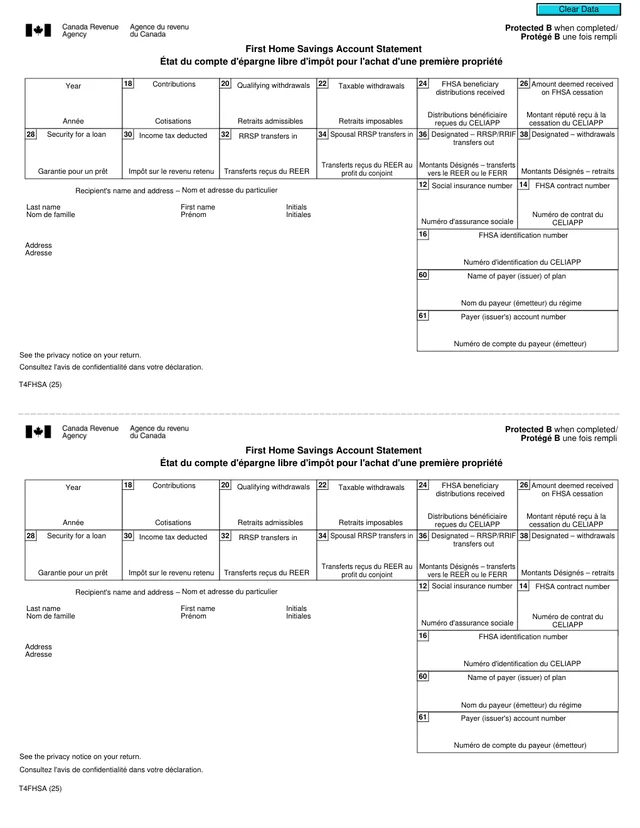
First Home Savings Account Statement
État du compte d'épargne libre d'impôt pour l'achat d'une première propriété
Year
Année
18
Contributions
Cotisations
20
Qualifying withdrawals
Retraits admissibles
22
Taxable withdrawals
Retraits imposables
24
FHSA beneficiary distributions received
Distributions bénéficiaire reçues du CELIAPP
26
Montant réputé reçu à la cessation du CELIAPP
Amount deemed received on FHSA cessation
28
Security for a loan
Garantie pour un prêt
30
Income tax deducted
Impôt sur le revenu retenu
32
RRSP transfers in
Transferts reçus du REER
34 Spousal RRSP transfers in
Transferts reçus du REER au profit du conjoint
36 Designated – RRSP/RRIF transfers out
Montants Désignés – transferts vers le REER ou le FERR
38 Designated – withdrawals
Montants Désignés – retraits
12 Social insurance number
Numéro d'assurance sociale
14
FHSA contract number
Numéro de contrat du
CELIAPP
16
FHSA identification number
Numéro d'identification du CELIAPP
60
Name of payer (issuer) of plan
Nom du payeur (émetteur) du régime
61
Payer (issuer's) account number
Numéro de compte du payeur (émetteur)
Recipient's name and address – Nom et adr
How to fill it
Fill or edit this form in MePDF
- Preview page 1 to confirm the form name and revision.
- Select Fill form to answer the form one page at a time.
- Type an answer for each field; checkboxes and choices use the form’s own options.
- Preview the finished pages, then download the flattened PDF.
- The downloaded copy is image-only, so it cannot be edited as a form again.
Copy figures exactly from the statement and keep the currency clear. The editor keeps the original layout while you fill the existing fields.