What's inside
Form content
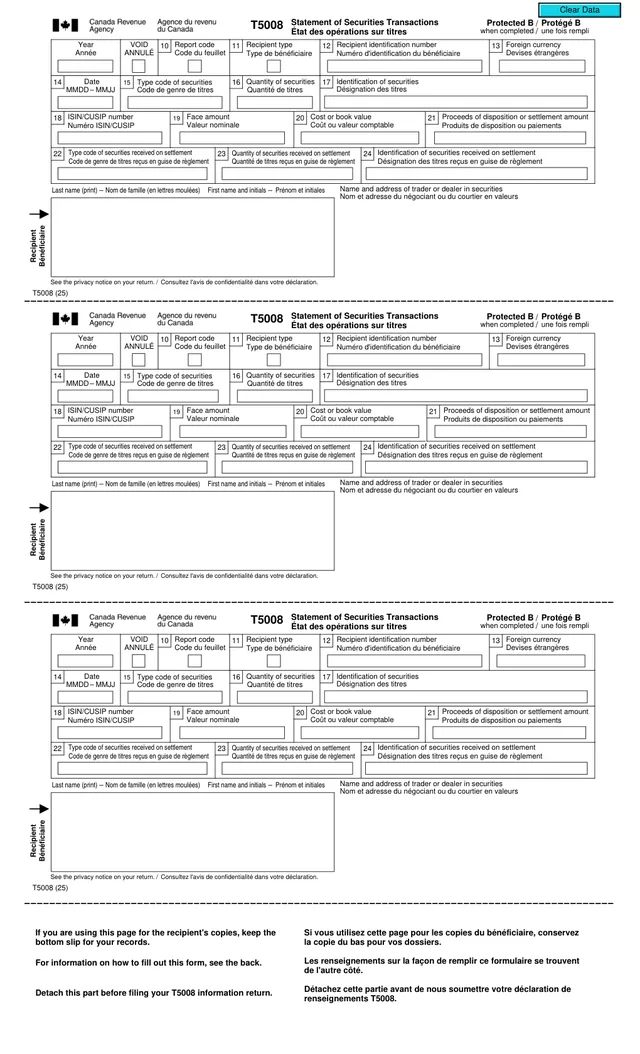
T5008
Statement of Securities Transactions
État des opérations sur titres
Protected B when completed
/
/
Protégé B une fois rempli
Year
Année
VOID
ANNULÉ
10
Report code
Code du feuillet
11
Recipient type
Type de bénéficiaire
12
Recipient identification number
Numéro d'identification du bénéficiaire
13
Foreign currency
Devises étrangères
14
Date
MMDD– MMJJ
15
Type code of securities
Code de genre de titres
16
Quantity of securities
Quantité de titres
17
Identification of securities
Désignation des titres
18
ISIN/CUSIP number
Numéro ISIN/CUSIP
19
Face amount
Valeur nominale
20
Cost or book value
Coût ou valeur comptable
21
Proceeds of disposition or settlement amount
Produits de disposition ou paiements
22
Type code of securities received on settlement
Code de genre de titres reçus en guise de règlement
23
Quantity of securities received on settlement
Quantité de titres reçus en guise de règlement
24
Identification of securities received on settlement
Désignation des titres reçus en guise de règlement
◄
Recipient
Bénéficiaire
Last name (print) – Nom de famille (en lettres moulées)
First name and initials – Prénom et initiales
Name and address of trader or dealer in securities
Nom et
How to fill it
Fill or edit this form in MePDF
- Preview page 1 to confirm the form name and revision.
- Select Fill form to answer the form one page at a time.
- Type an answer for each field; checkboxes and choices use the form’s own options.
- Preview the finished pages, then download the flattened PDF.
- The downloaded copy is image-only, so it cannot be edited as a form again.
Copy figures exactly from the statement and keep the currency clear. The editor keeps the original layout while you fill the existing fields.