What's inside
Form content
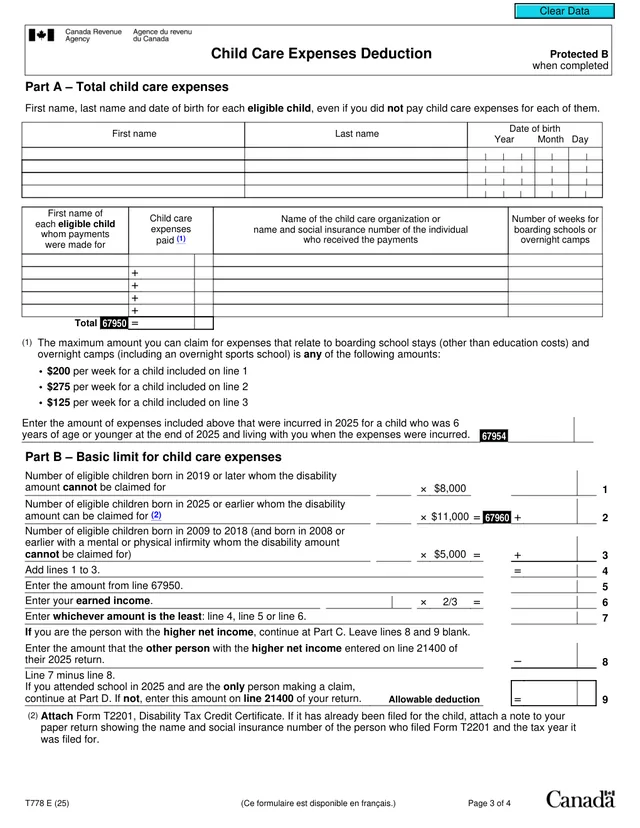
Child Care Expenses Deduction
Claiming child care expenses
If you are the only person supporting the eligible child, claim the child care expenses that you incurred while the eligible child was living with you. Fill out parts A and B, and Part D if it applies.
If you lived with one of the following individuals at any time in
2025 and at any time during the first 60 days of 2026, the person with the lower net income (including zero income) must complete this form:
• the eligible child's parent
• your spouse or common-law partner, if you are the father or the mother of the eligible child
• an individual claiming an amount on line 30400, line 30425, line 30450, or line 30500 of their return for the eligible child
If any of the situations in Part C or Part D apply, the child care expenses can either be claimed by the person with the higher net income, or in part by both the person with the higher net income and the person with the lower net income.
The person with the higher net income must calculate the claim first. However, both of you must fill out a separate
If you both have equal net incomes, you must agree on who will claim the child care expenses.
If you got married or became a
How to fill it
Fill or edit this form in MePDF
- Preview page 3 to confirm the form name and revision.
- Select Fill form to answer the form one page at a time.
- Type an answer for each field; checkboxes and choices use the form’s own options.
- Preview the finished pages, then download the flattened PDF.
- The downloaded copy is image-only, so it cannot be edited as a form again.
Keep the tax year and filing status consistent on every page. The editor keeps the original layout while you fill the existing fields.