What's inside
Form content
Protected B when completed
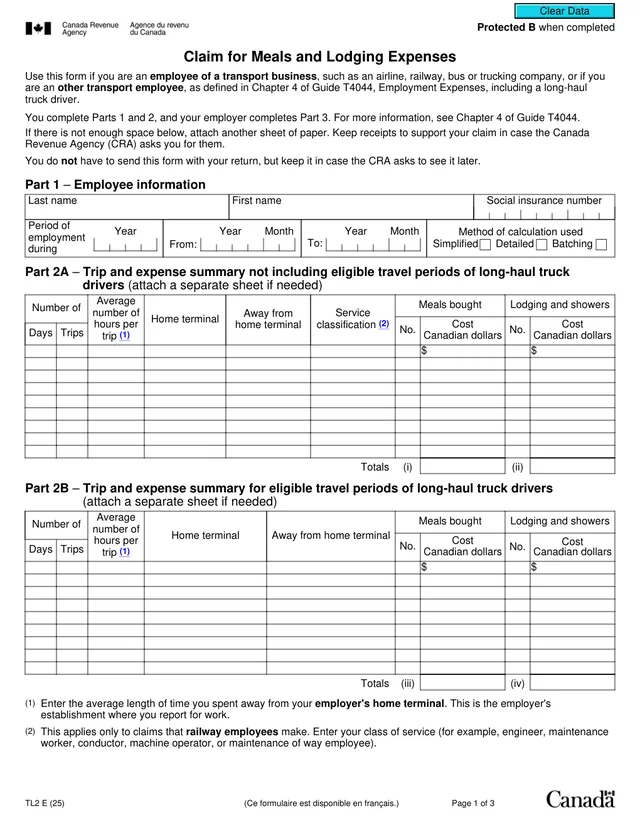
Claim for Meals and Lodging Expenses
Use this form if you are an employee of a transport business, such as an airline, railway, bus or trucking company, or if you are an other transport employee, as defined in Chapter 4 of Guide T4044, Employment Expenses, including a long-haul truck driver.
You complete Parts 1 and 2, and your employer completes Part 3. For more information, see Chapter 4 of Guide T4044.
If there is not enough space below, attach another sheet of paper. Keep receipts to support your claim in case the Canada
Revenue Agency (CRA) asks you for them.
You do not have to send this form with your return, but keep it in case the CRA asks to see it later.
Part 1 – Employee information
Last name
First name
Social insurance number
Period of employment during
Year
From:
Year Month
To:
Year Month
Method of calculation used
Simplified
Detailed
Batching
Part 2A – Trip and expense summary not including eligible travel periods of long-haul truck drivers (attach a separate sheet if needed)
Number of
Days Trips
Average number of hours per trip (1)
Home terminal
Away from home terminal
Service classification (2)
Meals bought
No.
Cost
Canadian dollars
Lodgin
How to fill it
Fill or edit this form in MePDF
- Preview page 1 to confirm the form name and revision.
- Select Fill form to answer the form one page at a time.
- Type an answer for each field; checkboxes and choices use the form’s own options.
- Preview the finished pages, then download the flattened PDF.
- The downloaded copy is image-only, so it cannot be edited as a form again.
Keep the tax year and filing status consistent on every page. The editor keeps the original layout while you fill the existing fields.