What's inside
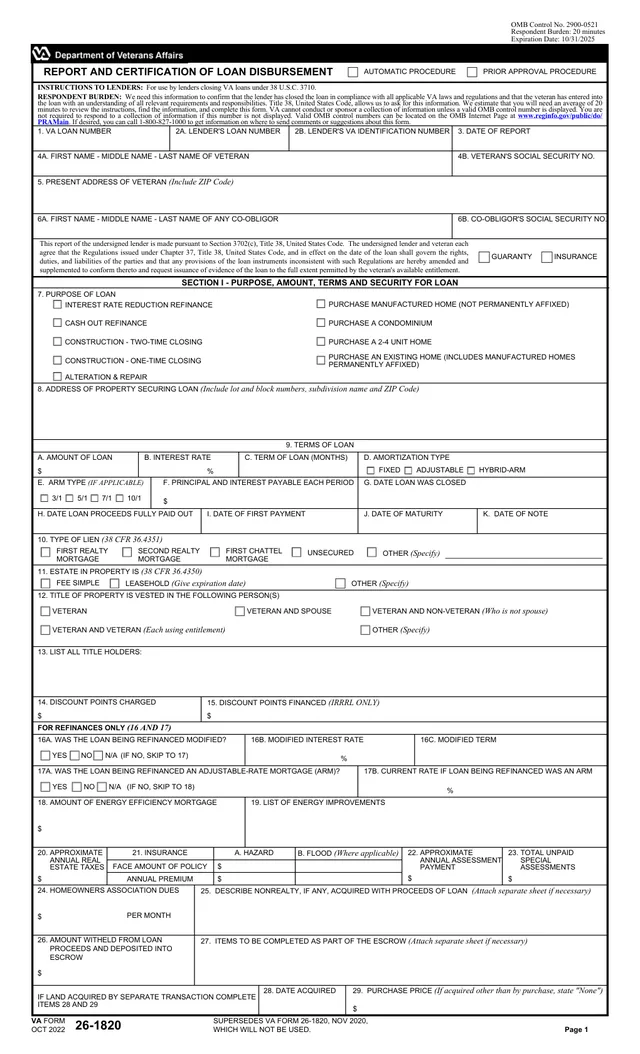
Form content
This report of the undersigned lender is made pursuant to Section 3702(c), Title 38, United States Code. The undersigned lender and veteran each agree that the Regulations issued under Chapter 37, Title 38, United States Code, and in effect on the date of the loan shall govern the rights, duties, and liabilities of the parties and that any provisions of the loan instruments inconsistent with such Regulations are hereby amended and supplemented to conform thereto and request issuance of evidence of the loan to the full extent permitted by the veteran's available entitlement.
REPORT AND CERTIFICATION OF LOAN DISBURSEMENT
AUTOMATIC PROCEDURE
PRIOR APPROVAL PROCEDURE
1. VA LOAN NUMBER
2A. LENDER'S LOAN NUMBER
2B. LENDER'S VA IDENTIFICATION NUMBER
3. DATE OF REPORT
4B. VETERAN'S SOCIAL SECURITY NO.
4A. FIRST NAME - MIDDLE NAME - LAST NAME OF VETERAN
6A. FIRST NAME - MIDDLE NAME - LAST NAME OF ANY CO-OBLIGOR
SECTION I - PURPOSE, AMOUNT, TERMS AND SECURITY FOR LOAN
7. PURPOSE OF LOAN
8. ADDRESS OF PROPERTY SECURING LOAN (Include lot and block numbers, subdivision name and ZIP Code)
9. TERMS OF LOAN
A. AMOUNT OF LOAN
E. ARM TYPE (IF APPLICABLE)
B. INTEREST RATE
C. TERM OF LOAN (MONTHS)
J.
How to fill it
Fill or edit this form in MePDF
- Preview page 1 to confirm the form name and revision.
- Select Fill form to answer the form one page at a time.
- Type an answer for each field; checkboxes and choices use the form’s own options.
- Preview the finished pages, then download the flattened PDF.
- The downloaded copy is image-only, so it cannot be edited as a form again.
Copy figures exactly from the statement and keep the currency clear. The editor keeps the original layout while you fill the existing fields.