What's inside
Form content
OFFICIAL: Sensitive – Personal
(when completed)
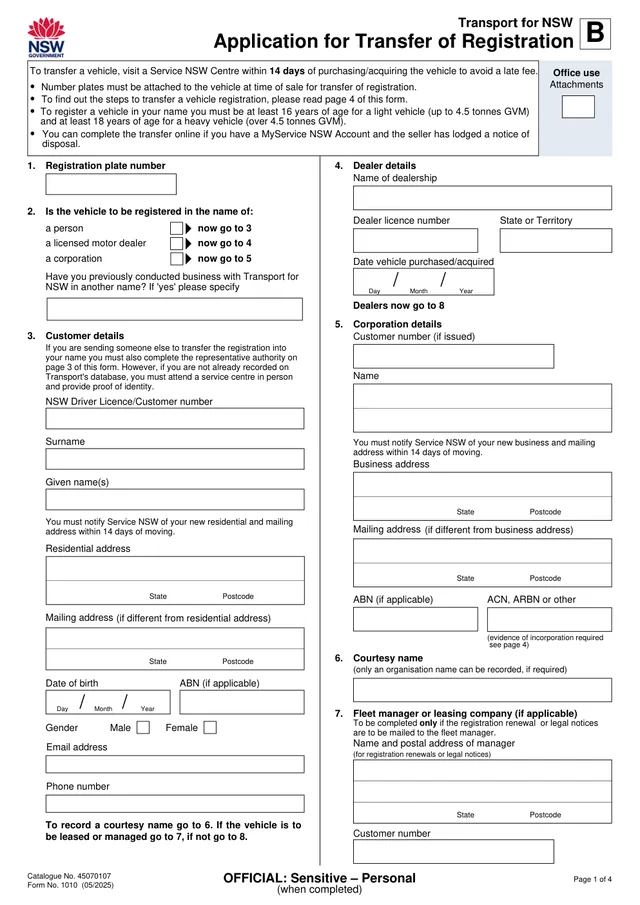
Application for Transfer of Registration
Registration plate number
If you are sending someone else to transfer the registration into your name you must also complete the representative authority on page 3 of this form. However, if you are not already recorded on
Transport's database, you must attend a service centre in person and provide proof of identity.
Date of birth
Surname
NSW Driver Licence/Customer number
Given name(s)
1.
Is the vehicle to be registered in the name of:
2.
now go to 3 a person now go to 4 a corporation a licensed motor dealer
3.
Residential address
Day
Month
Male
Female
To record a courtesy name go to 6. If the vehicle is to be leased or managed go to 7, if not go to 8.
Gender
ABN (if applicable)
You must notify Service NSW of your new residential and mailing address within 14 days of moving.
Year
/
/
Postcode
State now go to 5
Mailing address
Have you previously conducted business with Transport for
NSW in another name? If 'yes' please specify
4.
5.
Business address
Name
ABN (if applicable)
Customer number (if issued)
Corporation details
ACN, ARBN or other
6.
Courtesy name
(only an organisation name can be reco
How to fill it
Fill or edit this form in MePDF
- Preview page 1 to confirm the form name and revision.
- Select Fill form to answer the form one page at a time.
- Type an answer for each field; checkboxes and choices use the form’s own options.
- Preview the finished pages, then download the flattened PDF.
- The downloaded copy is image-only, so it cannot be edited as a form again.
Fill only the fields that apply and keep a copy of the finished PDF. The editor keeps the original layout while you fill the existing fields.