What's inside
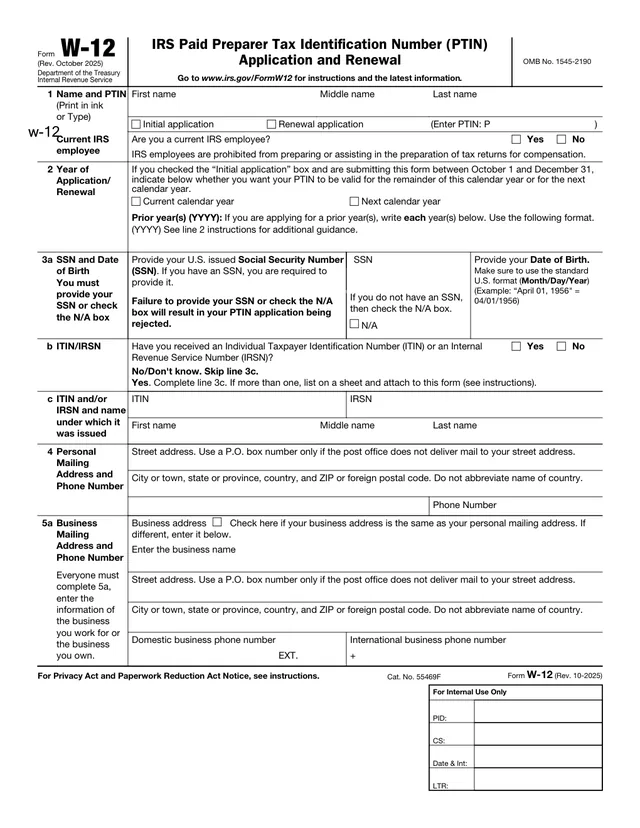
Form content
(Rev. October 2025)
IRS Paid Preparer Tax Identification Number (PTIN)
Application and Renewal
Go to www.irs.gov/FormW12 for instructions and the latest information.
1 Name and PTIN
(Print in ink or Type)
First name Middle name
Last name
Initial application
Renewal application
(Enter PTIN: P
)
Current IRS employee
Are you a current IRS employee?
Yes
No
IRS employees are prohibited from preparing or assisting in the preparation of tax returns for compensation.
2 Year of
Application/
Renewal
If you checked the “Initial application” box and are submitting this form between October 1 and December 31, indicate below whether you want your PTIN to be valid for the remainder of this calendar year or for the next calendar year.
Current calendar year
Next calendar year
Prior year(s) (YYYY): If you are applying for a prior year(s), write each year(s) below. Use the following format.
(YYYY) See line 2 instructions for additional guidance.
3a SSN and Date of Birth
You must provide your
SSN or check the N/A box
Provide your U.S. issued Social Security Number
(SSN). If you have an SSN, you are required to provide it.
Failure to provide your SSN or check the N/A box will result in your PTIN applic
How to fill it
Fill or edit this form in MePDF
- Preview page 1 to confirm the form name and revision.
- Select Fill form to answer the form one page at a time.
- Type an answer for each field; checkboxes and choices use the form’s own options.
- Preview the finished pages, then download the flattened PDF.
- The downloaded copy is image-only, so it cannot be edited as a form again.
Keep the tax year and filing status consistent on every page. The editor keeps the original layout while you fill the existing fields.