What's inside
Form content
Attention:
You may file Forms W-2 and W-3 electronically on the SSA’s Employer
W-2 Filing Instructions and Information web page, which is also accessible at www.socialsecurity.gov/employer. You can create fill-in versions of
Forms W-2 and W-3 for filing with SSA. You may also print out copies for filing with state or local governments, distribution to your employees, and for your records.
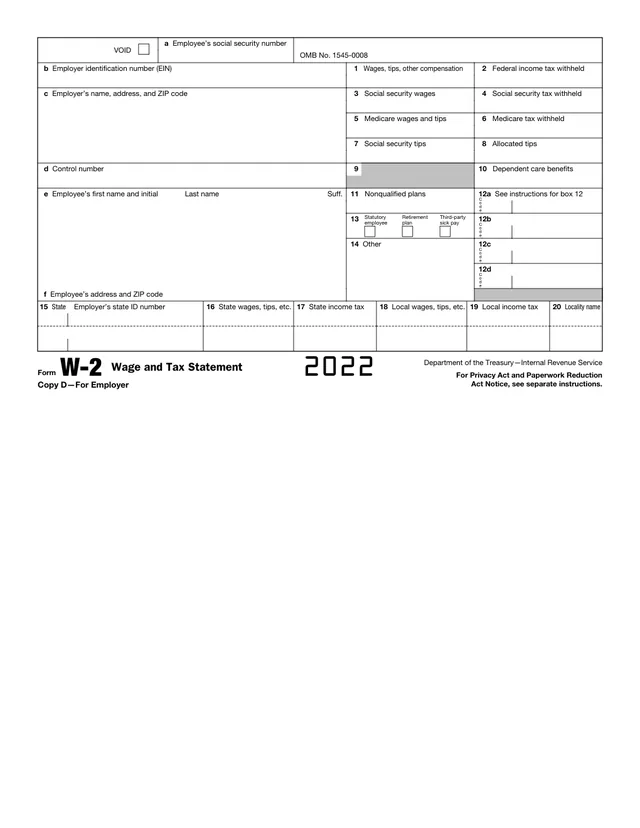
Note: Copy A of this form is provided for informational purposes only. Copy A appears in red, similar to the official IRS form. The official printed version of this IRS form is scannable, but the online version of it, printed from this website, is not. Do not print and file Copy A downloaded from this website with the SSA; a penalty may be imposed for filing forms that can’t be scanned. See the penalties section in the current General Instructions for Forms
W-2 and W-3, available at www.irs.gov/w2, for more information.
Please note that Copy B and other copies of this form, which appear in black, may be downloaded, filled in, and printed and used to satisfy the requirement to provide the information to the recipient.
To order official IRS information returns such as Forms W-2 and W-3, which includ
How to fill it
Fill or edit this form in MePDF
- Preview page 10 to confirm the form name and revision.
- Select Fill form to answer the form one page at a time.
- Type an answer for each field; checkboxes and choices use the form’s own options.
- Preview the finished pages, then download the flattened PDF.
- The downloaded copy is image-only, so it cannot be edited as a form again.
Keep the tax year and filing status consistent on every page. The editor keeps the original layout while you fill the existing fields.