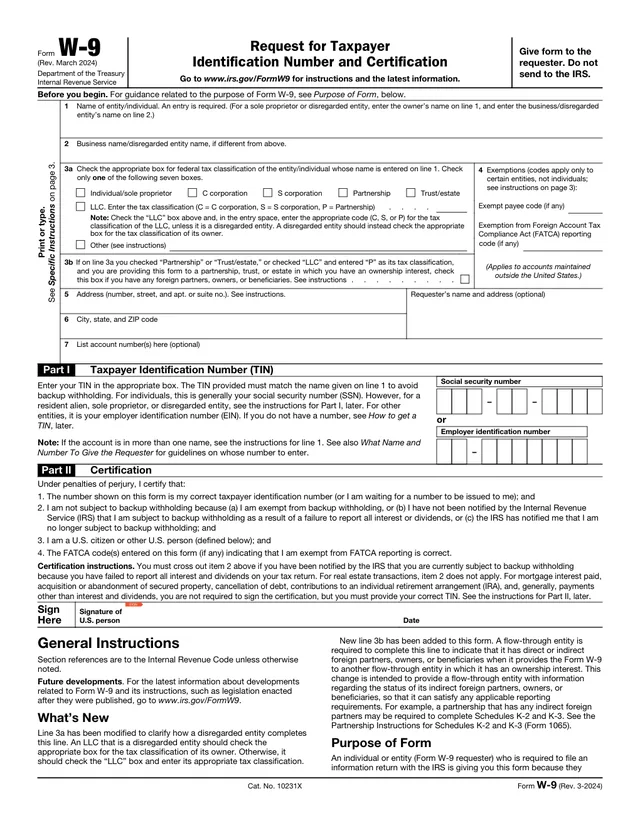
What's inside
Form content
(Rev. March 2024)
Request for Taxpayer
Identification Number and Certification
Go to www.irs.gov/FormW9 for instructions and the latest information.
Give form to the requester. Do not send to the IRS.
Before you begin. For guidance related to the purpose of Form W-9, see Purpose of Form, below.
Print or type.
See Specific Instructions on page 3.
1 Name of entity/individual. An entry is required. (For a sole proprietor or disregarded entity, enter the owner’s name on line 1, and enter the business/disregarded entity’s name on line 2.)
2 Business name/disregarded entity name, if different from above.
3a Check the appropriate box for federal tax classification of the entity/individual whose name is entered on line 1. Check only one of the following seven boxes.
Individual/sole proprietor
C corporation
S corporation
Partnership
Trust/estate
LLC. Enter the tax classification (C = C corporation, S = S corporation, P = Partnership)
.
.
.
.
Note: Check the “LLC” box above and, in the entry space, enter the appropriate code (C, S, or P) for the tax classification of the LLC, unless it is a disregarded entity. A disregarded entity should instead check the appropriate box for the tax classifi
How to fill it
Fill or edit this form in MePDF
- Preview page 1 to confirm the form name and revision.
- Select Fill form to answer the form one page at a time.
- Type an answer for each field; checkboxes and choices use the form’s own options.
- Preview the finished pages, then download the flattened PDF.
- The downloaded copy is image-only, so it cannot be edited as a form again.
Keep the tax year and filing status consistent on every page. The editor keeps the original layout while you fill the existing fields.