What's inside
Form content
MS001.2507
1 of 2
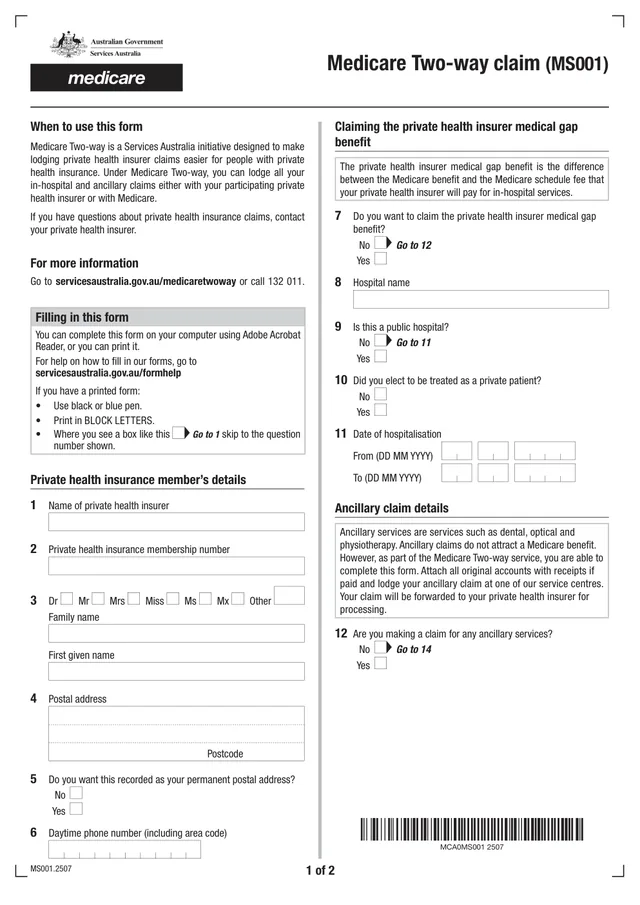
Medicare Two-way claim (MS001)
When to use this form
Medicare Two-way is a Services Australia initiative designed to make lodging private health insurer claims easier for people with private health insurance. Under Medicare Two-way, you can lodge all your in-hospital and ancillary claims either with your participating private health insurer or with Medicare.
If you have questions about private health insurance claims, contact your private health insurer.
For more information
Go to www.servicesaustralia.gov.au/medicaretwoway or call 132 011.
Filling in this form
You can complete this form on your computer using Adobe Acrobat
Reader, or you can print it.
For help on how to fill in our forms, go to www.
servicesaustralia.gov.au/formhelp
If you have a printed form:
•
Use black or blue pen.
•
Print in BLOCK LETTERS.
•
Where you see a box like this
Go to 1 skip to the question number shown.
Private health insurance member’s details
1
Name of private health insurer
2
Private health insurance membership number
3
Dr
Mr
Mrs
Miss
Ms
Mx
Other
Family name
First given name
4
Postal address
Postcode
5
Do you want this recorded as your permanent postal address?
No
Yes
6
Daytime p
How to fill it
Fill or edit this form in MePDF
- Preview page 1 to confirm the form name and revision.
- Select Fill form to answer the form one page at a time.
- Type an answer for each field; checkboxes and choices use the form’s own options.
- Preview the finished pages, then download the flattened PDF.
- The downloaded copy is image-only, so it cannot be edited as a form again.
Use the patient's legal name and the insurer's exact member details. The editor keeps the original layout while you fill the existing fields.