What's inside
Form content
CAUTION: NOT FOR FILING
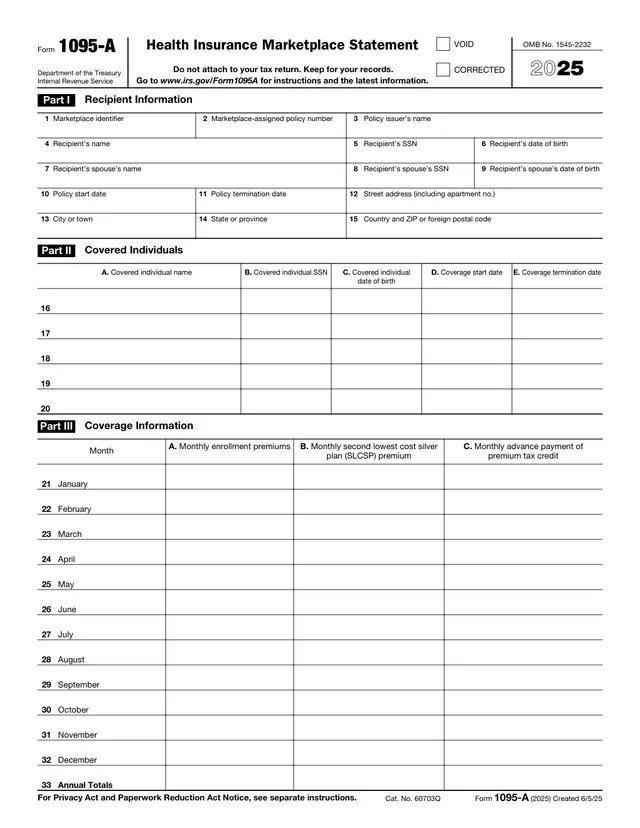
Form 1095-A is provided here for informational purposes only.
Health Insurance Marketplaces use Form 1095-A to report information on enrollments in a qualified health plan in the individual market through the Marketplace. As the form is to be completed by the Marketplaces, individuals cannot complete and use Form 1095-A available on IRS.gov. Individuals receiving a completed Form 1095-A from the Health
Insurance Marketplace will use the information received on the form and the guidance in the instructions to assist them in filing an accurate tax return.
2025
Health Insurance Marketplace Statement
Do not attach to your tax return. Keep for your records.
Go to www.irs.gov/Form1095A for instructions and the latest information.
VOID
CORRECTED
Part I
Recipient Information
1 Marketplace identifier
2 Marketplace-assigned policy number
3 Policy issuer’s name
4 Recipient’s name
5 Recipient’s SSN
6 Recipient’s date of birth
7 Recipient’s spouse’s name
8 Recipient’s spouse’s SSN
9 Recipient’s spouse’s date of birth
10 Policy start date
11 Policy termination date
12 Street address (including apartment no.)
13 City or town
14 State or province
15 Country and ZIP or forei
How to fill it
Fill or edit this form in MePDF
- Preview page 2 to confirm the form name and revision.
- Select Fill form to answer the form one page at a time.
- Type an answer for each field; checkboxes and choices use the form’s own options.
- Preview the finished pages, then download the flattened PDF.
- The downloaded copy is image-only, so it cannot be edited as a form again.
Use the patient's legal name and the insurer's exact member details. The editor keeps the original layout while you fill the existing fields.