What's inside
Form content
1
Form CMS-1490S (version 01/18)
DEPARTMENT OF HEALTH AND HUMAN SERVICES
CENTERS FOR MEDICARE & MEDICAID SERVICES
PATIENT’S REQUEST FOR MEDICAL PAYMENT
IMPORTANT: PLEASE READ THE ATTACHED INSTRUCTIONS PRIOR TO SUBMITTING A CLAIM TO MEDICARE
SEND ONLY THE COMPLETED FORM TO YOUR MEDICARE ADMINISTRATIVE CONTRACTOR – Include a copy of the itemized bill and any supporting documents. Make a copy of your claim submission for your records and allow at least 60 days for Medicare to receive and process your request.
Reference the Medicare Administrative Contractor Address Table for the correct address to mail your claim form.
Medicare will not process a beneficiary request for payment for diabetic test strips, Part B drugs, or for items paid for under the DMEPOS Competitive Bidding program.
Your reason for submitting this claim: (see the Instructions for additional information, check one box only)
The provider or supplier refused to file a claim for Medicare Covered Services
The provider or supplier is unable to file a claim for the Medicare Covered Services
The provider or supplier is not enrolled with Medicare
IF YOU NEED HELP, CALL 1-800-MEDICARE (1-800-633-4227). TTY USERS SHOULD CALL 1-87
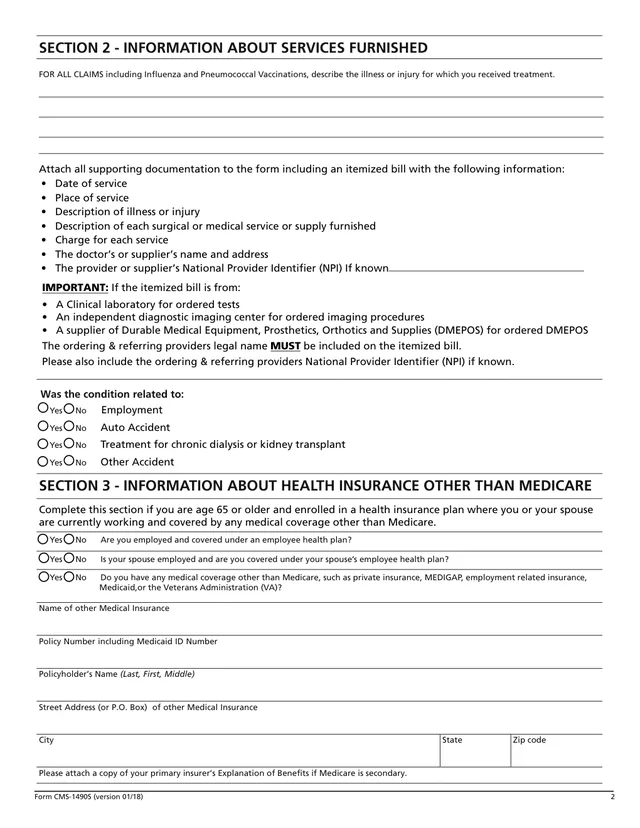
How to fill it
Fill or edit this form in MePDF
- Preview page 2 to confirm the form name and revision.
- Select Fill form to answer the form one page at a time.
- Type an answer for each field; checkboxes and choices use the form’s own options.
- Preview the finished pages, then download the flattened PDF.
- The downloaded copy is image-only, so it cannot be edited as a form again.
Use the patient's legal name and the insurer's exact member details. The editor keeps the original layout while you fill the existing fields.