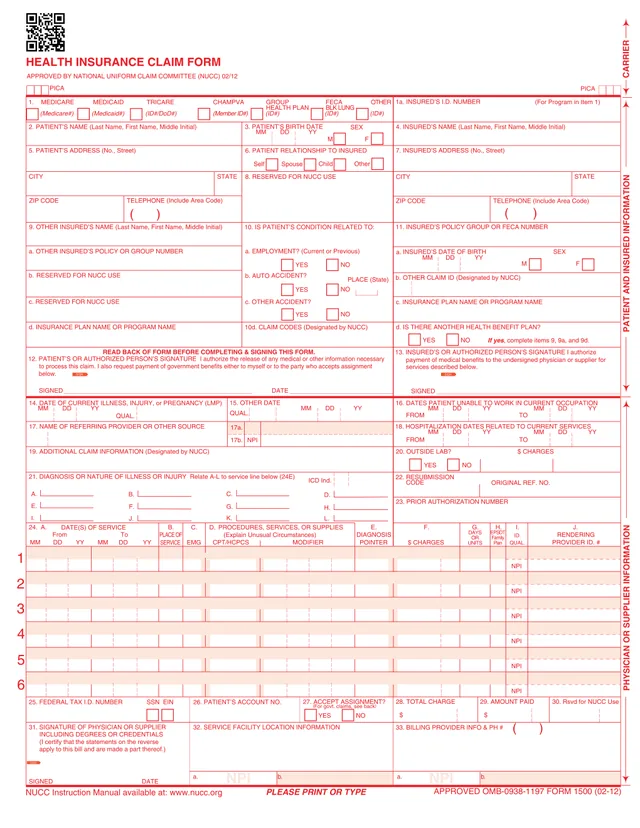
What's inside
Form content
APPROVED OMB-0938-1197 FORM 1500 (02-12)
PLEASE PRINT OR TYPE
SIGN
SIGN
SIGN
BECAUSE THIS FORM IS USED BY VARIOUS GOVERNMENT AND PRIVATE HEALTH PROGRAMS, SEE SEPARATE INSTRUCTIONS ISSUED BY
APPLICABLE PROGRAMS.
NOTICE: Any person who knowingly files a statement of claim containing any misrepresentation or any false, incomplete or misleading information may be guilty of a criminal act punishable under law and may be subject to civil penalties.
REFERS TO GOVERNMENT PROGRAMS ONLY
MEDICARE AND CHAMPUS PAYMENTS: A patient’s signature requests that payment be made and authorizes release of any information necessary to process the claim and certifies that the information provided in Blocks 1 through 12 is true, accurate and complete. In the case of a Medicare claim, the patient’s signature authorizes any entity to release to Medicare medical and nonmedical information, including employment status, and whether the person has employer group health insurance, liability, no-fault, worker’s compensation or other insurance which is responsible to pay for the services for which the Medicare claim is made. See 42
CFR 411.24(a). If item 9 is completed, the patient’s signature authorizes release of
How to fill it
Fill or edit this form in MePDF
- Preview page 1 to confirm the form name and revision.
- Select Fill form to answer the form one page at a time.
- Type an answer for each field; checkboxes and choices use the form’s own options.
- Preview the finished pages, then download the flattened PDF.
- The downloaded copy is image-only, so it cannot be edited as a form again.
Use the patient's legal name and the insurer's exact member details. The editor keeps the original layout while you fill the existing fields.