What's inside
Form content
Form CMS-L564 (Revised 03/2025)
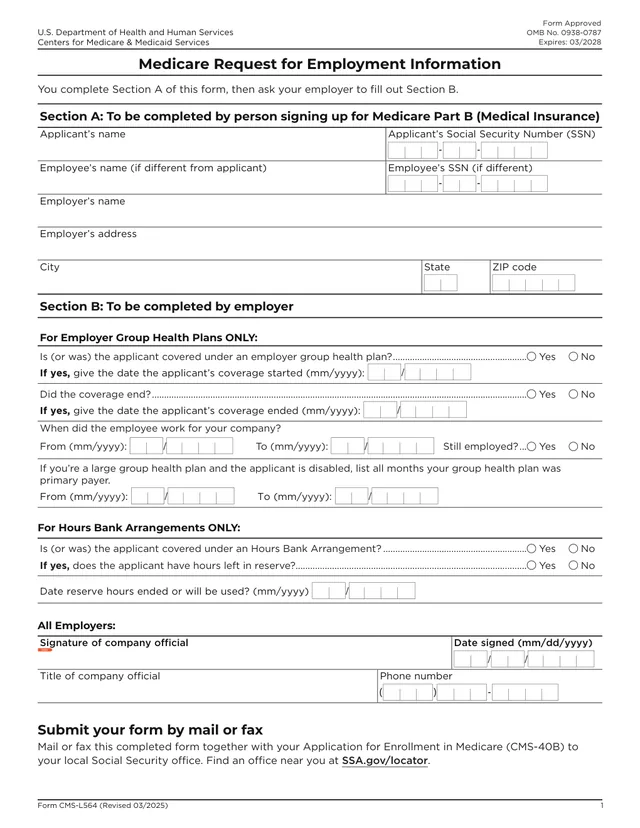
Medicare Request for Employment Information
Use this form to show proof of group health plan coverage based on current employment so you can enroll in Medicare. You complete Section A of this form, then ask your employer to fill out Section B.
To enroll in Medicare through a Special Enrollment Period, you must have had group health plan coverage through your or your spouse’s current employment since the first month you were eligible for Medicare
Part B. Your coverage must not have ended more than 8 months ago.
If you qualify for Medicare because of a disability, you must have large group health plan coverage based on your, your spouse’s or a family member’s current employment.
Submit your form by mail or fax
Mail or fax this completed form together with your Application for Enrollment in Medicare (CMS-40B) to your local Social Security office. Find an office near you at SSA.gov/locator.
Get help with this form
•
Phone: Call Social Security at 1-800-772-1213. TTY users call 1-800-325-0778.
•
En Español: Llame a SSA gratis al 1-800-772-1213 y oprima el 2 si desea el servicio en español y espere a que le atienda un agente.
•
In person: Visit your local
How to fill it
Fill or edit this form in MePDF
- Preview page 2 to confirm the form name and revision.
- Select Fill form to answer the form one page at a time.
- Type an answer for each field; checkboxes and choices use the form’s own options.
- Preview the finished pages, then download the flattened PDF.
- The downloaded copy is image-only, so it cannot be edited as a form again.
Use the patient's legal name and the insurer's exact member details. The editor keeps the original layout while you fill the existing fields.