What's inside
Form content
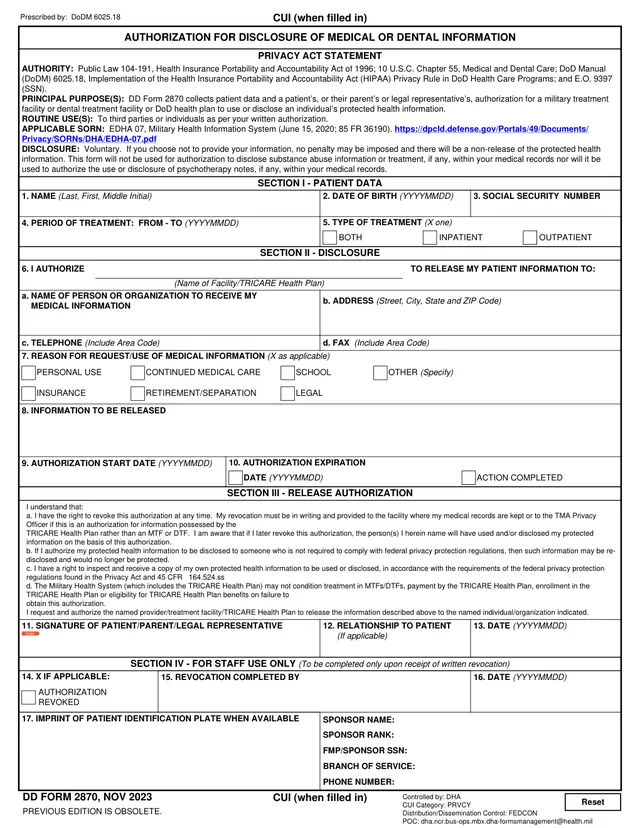
DD FORM 2870, NOV 2023
Prescribed by: DoDM 6025.18
PREVIOUS EDITION IS OBSOLETE.
CUI (when filled in)
CUI (when filled in)
Controlled by: DHA
CUI Category: PRVCY
Distribution/Dissemination Control: FEDCON
POC: [email protected]
AUTHORIZATION FOR DISCLOSURE OF MEDICAL OR DENTAL INFORMATION
PRIVACY ACT STATEMENT
AUTHORITY: Public Law 104-191, Health Insurance Portability and Accountability Act of 1996; 10 U.S.C. Chapter 55, Medical and Dental Care; DoD Manual
(DoDM) 6025.18, Implementation of the Health Insurance Portability and Accountability Act (HIPAA) Privacy Rule in DoD Health Care Programs; and E.O. 9397
(SSN).
PRINCIPAL PURPOSE(S): DD Form 2870 collects patient data and a patient’s, or their parent’s or legal representative’s, authorization for a military treatment facility or dental treatment facility or DoD health plan to use or disclose an individual’s protected health information.
ROUTINE USE(S): To third parties or individuals as per your written authorization.
APPLICABLE SORN: EDHA 07, Military Health Information System (June 15, 2020; 85 FR 36190). https://dpcld.defense.gov/Portals/49/Documents/
Privacy/SORNs/DHA/EDHA-07.pdf
DISCLOSURE:
How to fill it
Fill or edit this form in MePDF
- Preview page 1 to confirm the form name and revision.
- Select Fill form to answer the form one page at a time.
- Type an answer for each field; checkboxes and choices use the form’s own options.
- Preview the finished pages, then download the flattened PDF.
- The downloaded copy is image-only, so it cannot be edited as a form again.
Use the patient's legal name and the insurer's exact member details. The editor keeps the original layout while you fill the existing fields.