What's inside
Form content
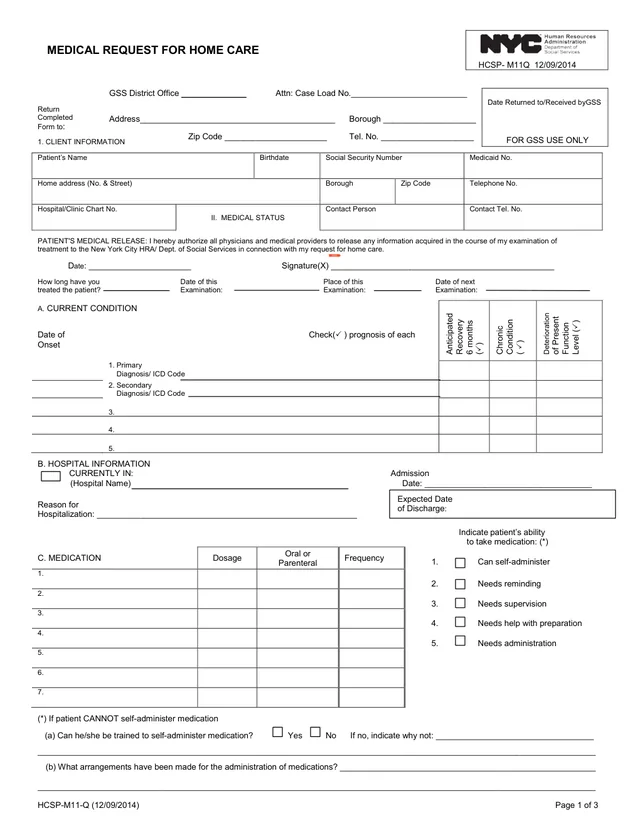
MEDICAL REQUEST FOR HOME CARE
HCSP- M11Q 12/09/2014
GSS District Office ______________
Attn: Case Load No._________________________
Date Returned to/Received byGSS
FOR GSS USE ONLY
Return
Completed
Form to:
Address__________________________________________
Borough ____________________
1. CLIENT INFORMATION
Zip Code ______________________
Tel. No. ____________________
Patient’s Name
Birthdate
Social Security Number
Medicaid No.
Home address (No. & Street)
Borough
Zip Code
Telephone No.
Hospital/Clinic Chart No.
II. MEDICAL STATUS
Contact Person
Contact Tel. No.
PATIENT'S MEDICAL RELEASE: I hereby authorize all physicians and medical providers to release any information acquired in the course of my examination of treatment to the New York City HRA/ Dept. of Social Services in connection with my request for home care.
Date: ______________________ Signature(X) ________________________________________________
How long have you treated the patient?
Date of this
Examination:
Place of this
Examination:
Date of next
Examination:
A. CURRENT CONDITION
Date of Check( ) prognosis of each
Onset
Anticipated
Recovery
6 months
()
Chronic
Condition
( )
Deterioration of Present
Function
Level ()
How to fill it
Fill or edit this form in MePDF
- Preview page 1 to confirm the form name and revision.
- Select Fill form to answer the form one page at a time.
- Type an answer for each field; checkboxes and choices use the form’s own options.
- Preview the finished pages, then download the flattened PDF.
- The downloaded copy is image-only, so it cannot be edited as a form again.
Use the patient's legal name and the insurer's exact member details. The editor keeps the original layout while you fill the existing fields.