What's inside
Form content
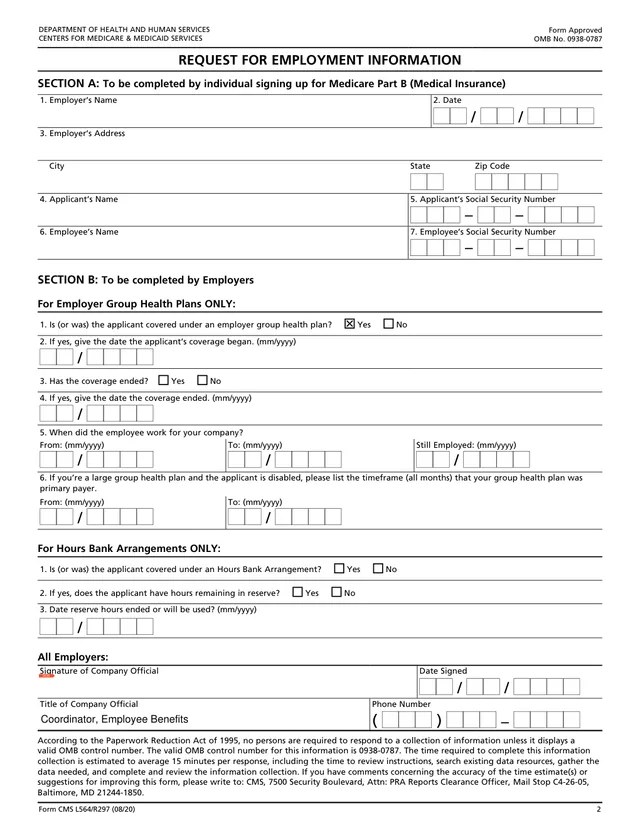
Form CMS L564/R297 (08/20)
2
DEPARTMENT OF HEALTH AND HUMAN SERVICES
CENTERS FOR MEDICARE & MEDICAID SERVICES
REQUEST FOR EMPLOYMENT INFORMATION
SECTION A: To be completed by individual signing up for Medicare Part B (Medical Insurance)
1. Employer’s Name
2. Date
/
/
3. Employer’s Address
City
State
Zip Code
4. Applicant’s Name
5. Applicant’s Social Security Number
–
–
6. Employee’s Name
7. Employee’s Social Security Number
–
–
SECTION B: To be completed by Employers
For Employer Group Health Plans ONLY:
1. Is (or was) the applicant covered under an employer group health plan?
Yes
No
2. If yes, give the date the applicant’s coverage began. (mm/yyyy)
/
3. Has the coverage ended?
Yes
No
4. If yes, give the date the coverage ended. (mm/yyyy)
/
5. When did the employee work for your company?
From: (mm/yyyy)
/
To: (mm/yyyy)
/
Still Employed: (mm/yyyy)
/
6. If you’re a large group health plan and the applicant is disabled, please list the timeframe (all months) that your group health plan was primary payer.
From: (mm/yyyy)
/
To: (mm/yyyy)
/
For Hours Bank Arrangements ONLY:
1. Is (or was) the applicant covered under an Hours Bank Arrangement?
Yes
No
2. If yes, does the applicant have hou
How to fill it
Fill or edit this form in MePDF
- Preview page 1 to confirm the form name and revision.
- Select Fill form to answer the form one page at a time.
- Type an answer for each field; checkboxes and choices use the form’s own options.
- Preview the finished pages, then download the flattened PDF.
- The downloaded copy is image-only, so it cannot be edited as a form again.
Use the patient's legal name and the insurer's exact member details. The editor keeps the original layout while you fill the existing fields.