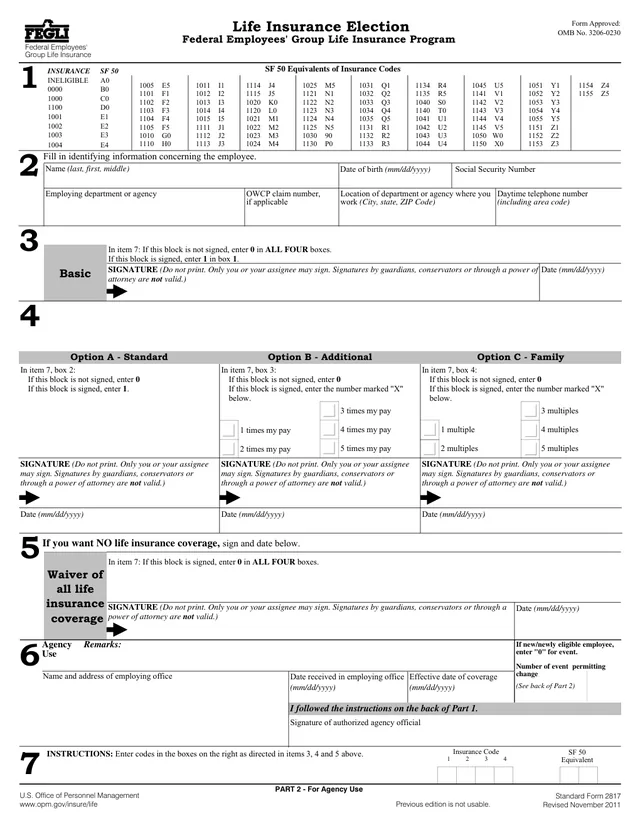
First page of SF 2822 Request for Insurance FEGLI Program for Federal Employees Page 3 preview

Healthcare · United States / General

SF 2822 Request for Insurance FEGLI Program for Federal Employees

Group Life Insurance

0Views
0Downloads
5Pages
64Fields
Fill form

Form details

Category
Healthcare
Country
United States / General
Pages
5
Fields
64
Type
Fillable PDF
Added
25 Nov 2026

What's inside

Form content

Federal Employees'
Group Life Insurance
Form Approved:
Life Insurance Election
Federal Employees' Group Life Insurance Program
See Privacy Act Statement on back of Part 3
1
General Instructions
.Read the back of Part 3 - Employee Copy carefully.
By law, unless you waive all coverage or are ineligible, you are automatically .Assignees completing this form should read Items 5 and 6 on the covered for Basic life insurance as an employee. When you first become back of Part 3.
eligible for FEGLI, you may (1) do nothing and have Basic automatically,
.Give all parts of your completed form to your employing office.
(2) elect Basic and any or all of the options, or (3) waive all life insurance
Your employing office will complete Section 6 of this form (or its coverage. If you are changing a previous election, see the back of Part 3 - electronic equivalent) and return your copy to you.
Employee Copy.
*This election supersedes all previous elections.*
2
Fill in identifying information concerning the employee.
Name (last, first, middle)
Date of birth (mm/dd/yyyy)
Social Security Number
Employing department or agency
OWCP claim number, if applicable
Location of department or agency where you wo

FieldsSection 2. Identifying information concerning the employee. Enter the name in last, first, middle format.Section 2. Identifying information concerning the employee. Enter the employee's date of birth. Enter a two digit month and day and a four digit year.Section 2. Identifying information concerning the employee. Enter the employee's social security number.Section Two. Identifying information concerning the employee. Enter the employing department or agency.Section Two. Identifying information concerning the employee. Enter the OWCP claim number, if applicable.Section Two. Identifying information concerning the employee. Enter the location of department or agency where employee works (City, state, ZIP Code).Section Two. Identifying information concerning the employee. Enter the daytime telephone number, including area code.Section 3. To elect of retain basic. Enter the date you signed the SF 2817 authorizing deductions to pay your share of the cost for Basic Life Insurance. Enter a two digit month and day and a four digit year.Section 4. Optional. Enter the date you signed the S F 28 17 electing option, A, Standard, authorizing deductions to pay the full cost. Enter a two digit month and day and a four digit year.Section 4. Option B. This is check box one of five. Press the space bar to check this box if you want Option B in the multiple of one times your annual basic pay.Section 4. Option B. This is check box two of five. Press the space bar to check this box if you want Option B in the multiple of two times your annual basic pay.Section 4. Option B. This is check box three of five. Press the space bar to check this box if you want Option B in the multiple of three times your annual basic pay.

How to fill it

Fill or edit this form in MePDF

  1. Preview page 3 to confirm the form name and revision.
  2. Select Fill form to answer the form one page at a time.
  3. Type an answer for each field; checkboxes and choices use the form’s own options.
  4. Preview the finished pages, then download the flattened PDF.
  5. The downloaded copy is image-only, so it cannot be edited as a form again.

Use the patient's legal name and the insurer's exact member details. The editor keeps the original layout while you fill the existing fields.