What's inside
Form content
JOHN F. KING
COMMISSIONER OF INSURANCE
SAFETY FIRE COMMISSIONER
INDUSTRIAL LOAN COMMISSIONER
SEVENTH FLOOR, WEST TOWER
FLOYD BUILDING
2 MARTIN LUTHER KING, JR. DRIVE
ATLANTA, GA 30334
(404) 656-2056 www.oci.ga.gov
OFFICE OF
INSURANCE AND SAFETY FIRE COMMISSIONER
THE OFFICE OF INSURANCE AND SAFETY FIRE COMMISSIONER DOES NOT DISCRIMINATE ON THE BASIS OF RACE, COLOR, NATIONAL ORIGIN,
SEX, RELIGION, AGE OR DISABILITY IN EMPLOYMENT OR THE PROVISION OF PROGRAMS OR SERVICES
Instructions for Completing the CONSUMER Complaint Form
Consumer complaint filings can be made choosing ONE (please select only ONE) of the following methods:
Consumer Complaint
Portal:
www.oci.ga.gov
(preferred method)
Fax:
(404) 657-8542
Postal Mail:
Georgia Insurance Commissioner’s Office
Consumer Services Division
2 Martin Luther King, Jr., Drive, Suite 716, West Tower
Atlanta, GA 30334
* On-line Consumer Complaint Portal filing is the preferred method because it follows a digital workflow reducing processing costs.
Follow these steps only if faxing or postal mailing the insurance issues to the Department:
•
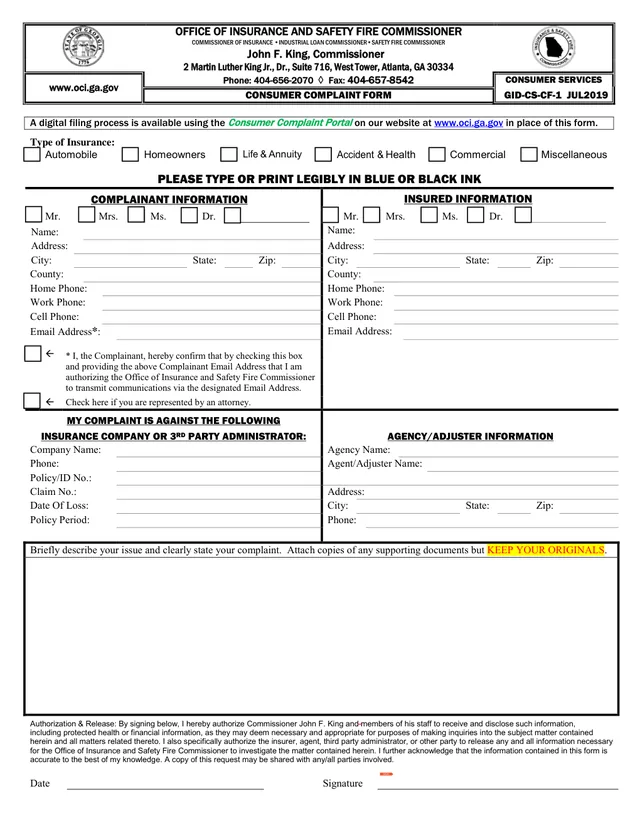
Complete the Consumer Complaint Form GID-CS-CF-1 to file the complaint by:
- filling in the interactive form
How to fill it
Fill or edit this form in MePDF
- Preview page 2 to confirm the form name and revision.
- Select Fill form to answer the form one page at a time.
- Type an answer for each field; checkboxes and choices use the form’s own options.
- Preview the finished pages, then download the flattened PDF.
- The downloaded copy is image-only, so it cannot be edited as a form again.
Use the patient's legal name and the insurer's exact member details. The editor keeps the original layout while you fill the existing fields.