What's inside
Form content
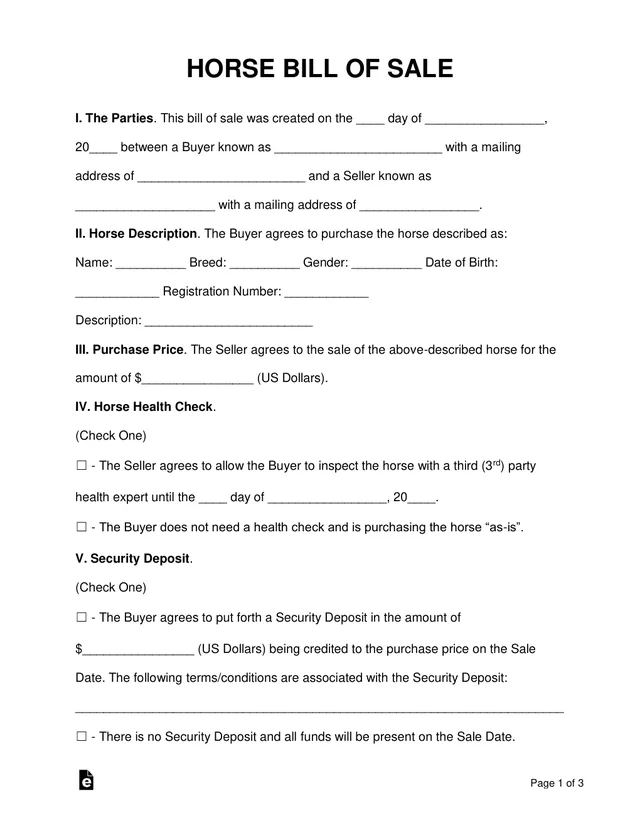
HORSE BILL OF SALE
I. The Parties. This bill of sale was created on the ____ day of _________________,
20____ between a Buyer known as ________________________ with a mailing address of ________________________ and a Seller known as
____________________ with a mailing address of _________________.
II. Horse Description. The Buyer agrees to purchase the horse described as:
Name: __________ Breed: __________ Gender: __________ Date of Birth:
____________ Registration Number: ____________
Description: ________________________
III. Purchase Price. The Seller agrees to the sale of the above-described horse for the amount of $________________ (US Dollars).
IV. Horse Health Check.
(Check One)
☐ - The Seller agrees to allow the Buyer to inspect the horse with a third (3rd) party health expert until the ____ day of _________________, 20____.
☐ - The Buyer does not need a health check and is purchasing the horse “as-is”.
V. Security Deposit.
(Check One)
☐ - The Buyer agrees to put forth a Security Deposit in the amount of
$________________ (US Dollars) being credited to the purchase price on the Sale
Date. The following terms/conditions are associated with the Security Deposit:
_____________
How to fill it
Fill or edit this form in MePDF
- Preview page 1 to confirm the form name and revision.
- Select Fill form to answer the form one page at a time.
- Type an answer for each field; checkboxes and choices use the form’s own options.
- Preview the finished pages, then download the flattened PDF.
- The downloaded copy is image-only, so it cannot be edited as a form again.
Use the patient's legal name and the insurer's exact member details. The editor keeps the original layout while you fill the existing fields.