What's inside
Form content
_______________________________________
________________________________
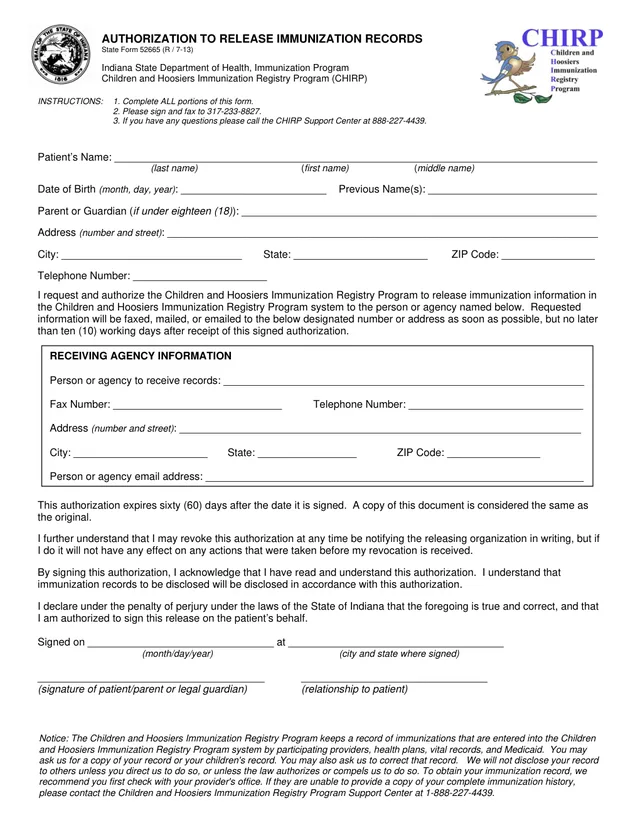
AUTHORIZATION TO RELEASE IMMUNIZATION RECORDS
State Form 52665 (R / 7-13)
Indiana State Department of Health, Immunization Program
Children and Hoosiers Immunization Registry Program (CHIRP)
INSTRUCTIONS:
1. Complete ALL portions of this form.
2. Please sign and fax to 317-233-8827.
3. If you have any questions please call the CHIRP Support Center at 888-227-4439.
Patient’s Name: ___________________________________________________________________________________
(last name)
(first name)
(middle name)
Date of Birth (month, day, year): _________________________
Previous Name(s): _____________________________
Parent or Guardian (if under eighteen (18)): _____________________________________________________________
Address (number and street): __________________________________________________________________________
City: _______________________________
State: _______________________
ZIP Code: ________________
Telephone Number: _______________________
I request and authorize the Children and Hoosiers Immunization Registry Program to release immunization information in the Children and Hoosiers Immunization Regist
How to fill it
Fill or edit this form in MePDF
- Preview page 1 to confirm the form name and revision.
- Select Fill form to answer the form one page at a time.
- Type an answer for each field; checkboxes and choices use the form’s own options.
- Preview the finished pages, then download the flattened PDF.
- The downloaded copy is image-only, so it cannot be edited as a form again.
Use the patient's legal name and the insurer's exact member details. The editor keeps the original layout while you fill the existing fields.