What's inside
Form content
QUEENSLAND HEALTH IMMUNISATION PROGRAM (QHIP)
IMMUNISATION SERVICE PROVIDER
IMMUNISATION ORDER FORM
• If completing the form by hand, ensure all information is clearly written.
• If your service has recently changed name, opening hours or location and QHIP has not been informed - do not place an order. Contact [email protected]
• Only place an order if your service requires stock. Please do not hold excess stock on hand.
• QHIP may not replace stock that have been held for long periods and expired.
• Only emailed orders will be accepted. Email completed orders to [email protected]
Order Date
ISP Number
Practice Name
Delivery Address
Email address
Telephone Number
YES
NO
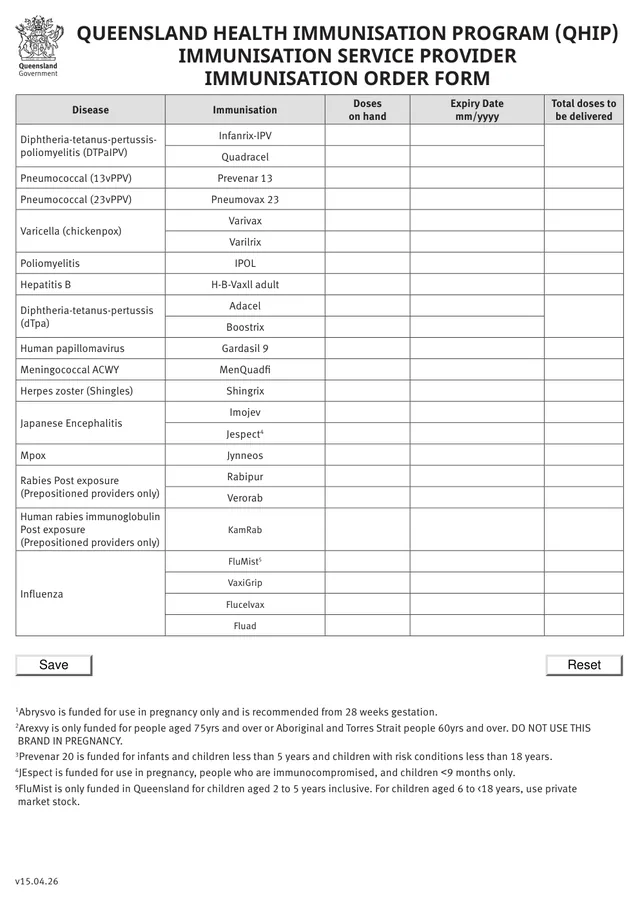
Disease
Immunisation
Doses on hand
Expiry Date mm/yyyy
Total doses to be delivered
Hepatitis B
Engerix B paediatric
H-B-Vaxll paediatric
Respiratory Syncytial Virus
Abrysvo1
Arexvy2
Beyfortus (Nirsevimab 50mg)
Beyfortus (Nirsevimab 100mg)
DTPa-hep B-IPV-Hib
Infanrix Hexa
Vaxelis
Pneumococcal (20vPCV)
Prevenar 203
Rotavirus
Rotarix (oral)
Meningococcal ACWY
Nimenrix
Meningococcal B
Bexsero
Measles-mumps-rubella
Priorix
MMRII
Haemophilus influenzae type b
Act-Hib
Measles-mumps-rubella-varicella
P
How to fill it
Fill or edit this form in MePDF
- Preview page 2 to confirm the form name and revision.
- Select Fill form to answer the form one page at a time.
- Type an answer for each field; checkboxes and choices use the form’s own options.
- Preview the finished pages, then download the flattened PDF.
- The downloaded copy is image-only, so it cannot be edited as a form again.
Use the patient's legal name and the insurer's exact member details. The editor keeps the original layout while you fill the existing fields.