What's inside
Form content
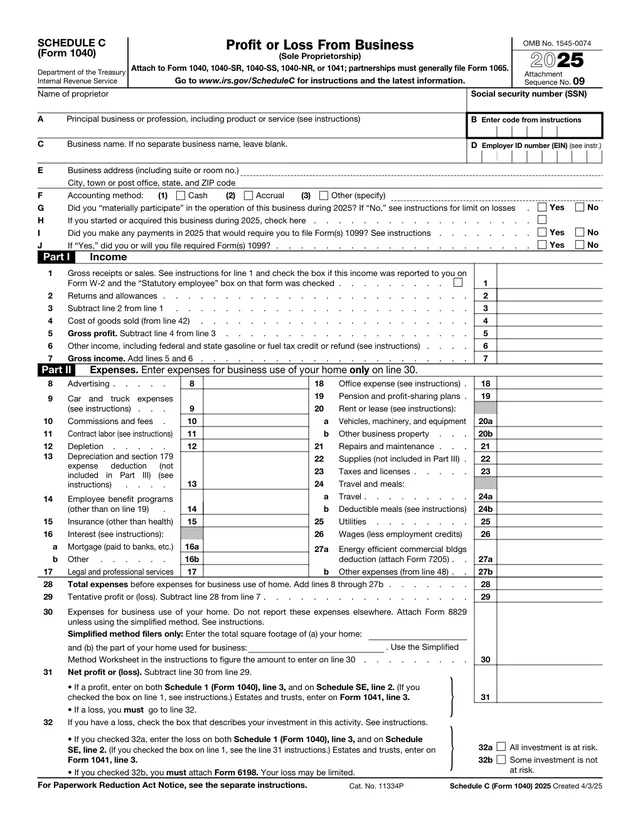
(Form 1040)
2025
Profit or Loss From Business
(Sole Proprietorship)
Attach to Form 1040, 1040-SR, 1040-SS, 1040-NR, or 1041; partnerships must generally file Form 1065.
Go to www.irs.gov/ScheduleC for instructions and the latest information.
Attachment
Sequence No. 09
Name of proprietor
Social security number (SSN)
A Principal business or profession, including product or service (see instructions)
B Enter code from instructions
C Business name. If no separate business name, leave blank.
D Employer ID number (EIN) (see instr.)
E
Business address (including suite or room no.)
City, town or post office, state, and ZIP code
F
Accounting method:
(1)
Cash
(2)
Accrual
(3)
Other (specify)
G
Did you “materially participate” in the operation of this business during 2025? If “No,” see instructions for limit on losses
.
Yes
No
H
If you started or acquired this business during 2025, check here .
.
.
.
.
.
.
.
.
.
.
.
.
.
.
.
.
.
I
Did you make any payments in 2025 that would require you to file Form(s) 1099? See instructions .
.
.
.
.
.
.
.
Yes
No
J
If “Yes,” did you or will you file required Form(s) 1099? .
.
.
.
.
.
.
.
.
.
.
.
.
.
.
.
.
.
.
.
.
Yes
No
Part I
Income
1
Gross receipts or sales.
How to fill it
Fill or edit this form in MePDF
- Preview page 1 to confirm the form name and revision.
- Select Fill form to answer the form one page at a time.
- Type an answer for each field; checkboxes and choices use the form’s own options.
- Preview the finished pages, then download the flattened PDF.
- The downloaded copy is image-only, so it cannot be edited as a form again.
Use the registered business name and the correct tax identifier. The editor keeps the original layout while you fill the existing fields.