What's inside
Form content
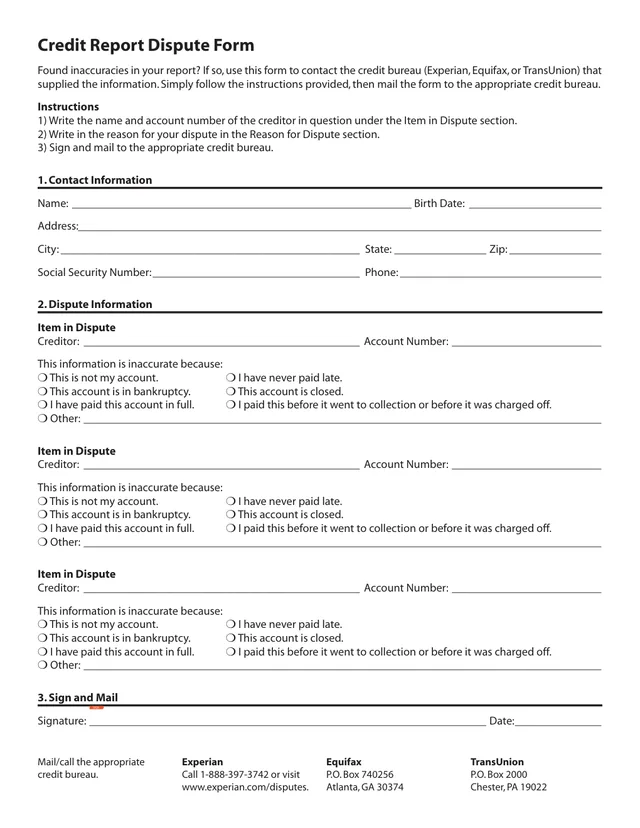
Credit Report Dispute Form
Found inaccuracies in your report? If so, use this form to contact the credit bureau (Experian, Equifax, or TransUnion) that supplied the information. Simply follow the instructions provided, then mail the form to the appropriate credit bureau.
Instructions
1) Write the name and account number of the creditor in question under the Item in Dispute section.
2) Write in the reason for your dispute in the Reason for Dispute section.
3) Sign and mail to the appropriate credit bureau.
1. Contact Information
Name: ___________________________________________________________ Birth Date: _______________________
Address: ___________________________________________________________________________________________
City: ____________________________________________________ State: ________________ Zip: ________________
Social Security Number: ____________________________________ Phone: ___________________________________
2. Dispute Information
Item in Dispute
Creditor: ________________________________________________ Account Number: __________________________
This information is inaccurate because:
m This is not my account.
m I have never paid late.
m This account is in
How to fill it
Fill or edit this form in MePDF
- Preview page 1 to confirm the form name and revision.
- Select Fill form to answer the form one page at a time.
- Type an answer for each field; checkboxes and choices use the form’s own options.
- Preview the finished pages, then download the flattened PDF.
- The downloaded copy is image-only, so it cannot be edited as a form again.
Use the registered business name and the correct tax identifier. The editor keeps the original layout while you fill the existing fields.