What's inside
Form content
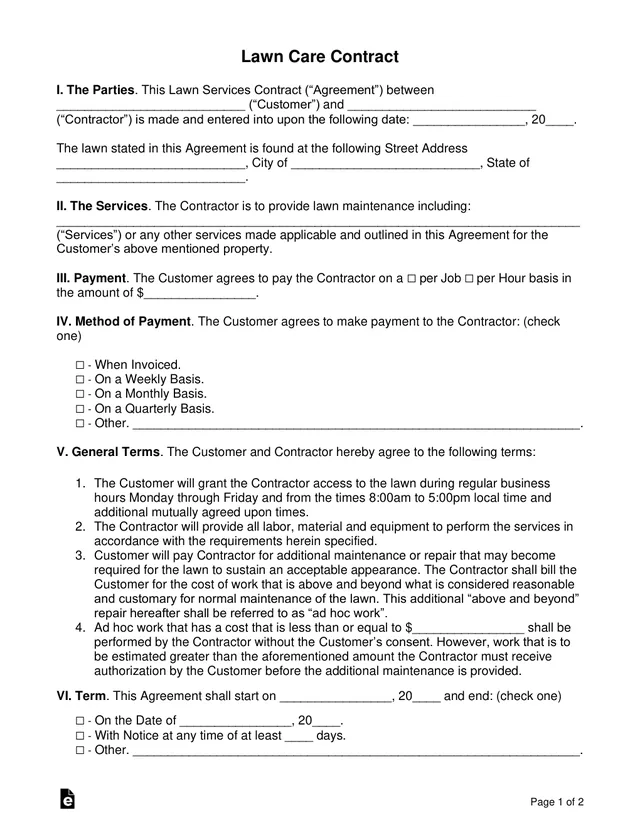
Lawn Care Contract
I. The Parties. This Lawn Services Contract (“Agreement”) between
___________________________ (“Customer”) and ___________________________
(“Contractor”) is made and entered into upon the following date: ________________, 20____.
The lawn stated in this Agreement is found at the following Street Address
___________________________, City of ___________________________, State of
___________________________.
II. The Services. The Contractor is to provide lawn maintenance including:
___________________________________________________________________________
(“Services”) or any other services made applicable and outlined in this Agreement for the
Customer’s above mentioned property.
III. Payment. The Customer agrees to pay the Contractor on a ☐ per Job ☐ per Hour basis in the amount of $________________.
IV. Method of Payment. The Customer agrees to make payment to the Contractor: (check one)
☐ - When Invoiced.
☐ - On a Weekly Basis.
☐ - On a Monthly Basis.
☐ - On a Quarterly Basis.
☐ - Other. ________________________________________________________________.
V. General Terms. The Customer and Contractor hereby agree to the following terms:
1. The Customer will grant t
How to fill it
Fill or edit this form in MePDF
- Preview page 1 to confirm the form name and revision.
- Select Fill form to answer the form one page at a time.
- Type an answer for each field; checkboxes and choices use the form’s own options.
- Preview the finished pages, then download the flattened PDF.
- The downloaded copy is image-only, so it cannot be edited as a form again.
Use the registered business name and the correct tax identifier. The editor keeps the original layout while you fill the existing fields.