What's inside
Form content
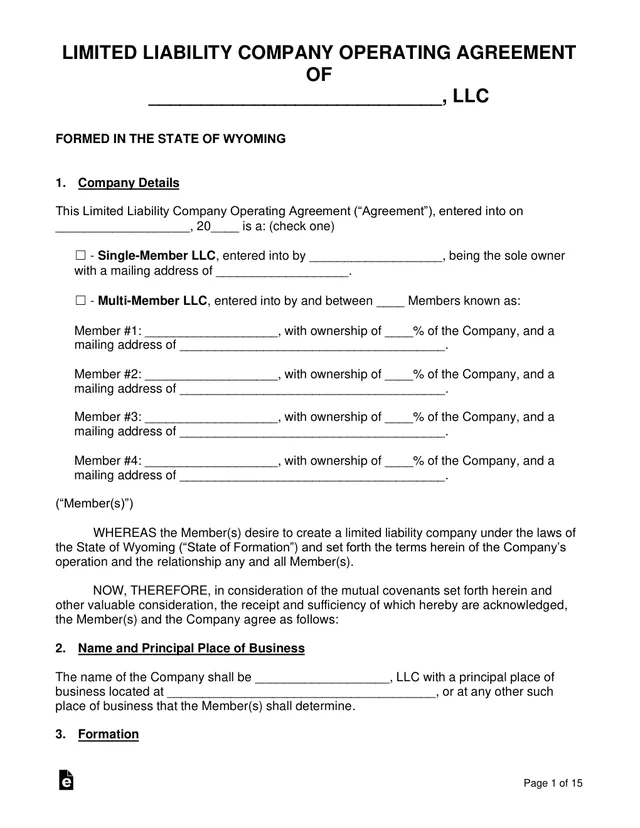
LIMITED LIABILITY COMPANY OPERATING AGREEMENT
OF
____________________________, LLC
FORMED IN THE STATE OF WYOMING
1. Company Details
This Limited Liability Company Operating Agreement (“Agreement”), entered into on
___________________, 20____ is a: (check one)
☐- Single-Member LLC, entered into by ___________________, being the sole owner with a mailing address of ___________________.
☐- Multi-Member LLC, entered into by and between ____ Members known as:
Member #1: ___________________, with ownership of ____% of the Company, and a mailing address of ______________________________________.
Member #2: ___________________, with ownership of ____% of the Company, and a mailing address of ______________________________________.
Member #3: ___________________, with ownership of ____% of the Company, and a mailing address of ______________________________________.
Member #4: ___________________, with ownership of ____% of the Company, and a mailing address of ______________________________________.
(“Member(s)”)
WHEREAS the Member(s) desire to create a limited liability company under the laws of the State of Wyoming (“State of Formation”) and set forth the terms herein of the Company’s o
How to fill it
Fill or edit this form in MePDF
- Preview page 1 to confirm the form name and revision.
- Select Fill form to answer the form one page at a time.
- Type an answer for each field; checkboxes and choices use the form’s own options.
- Preview the finished pages, then download the flattened PDF.
- The downloaded copy is image-only, so it cannot be edited as a form again.
Use the registered business name and the correct tax identifier. The editor keeps the original layout while you fill the existing fields.